Engineering · 2026.10.25 · 6 min · Updated 2026.10.26
Two Minutes to Publish: Moving a Static Astro Blog to Rendering on Cloudflare Workers
Every post used to trigger a 1 to 2 minute rebuild. With Workers rendering and edge caching, publishing now purges one cache tag and goes live in about 5 seconds, on the free plan.
Reading
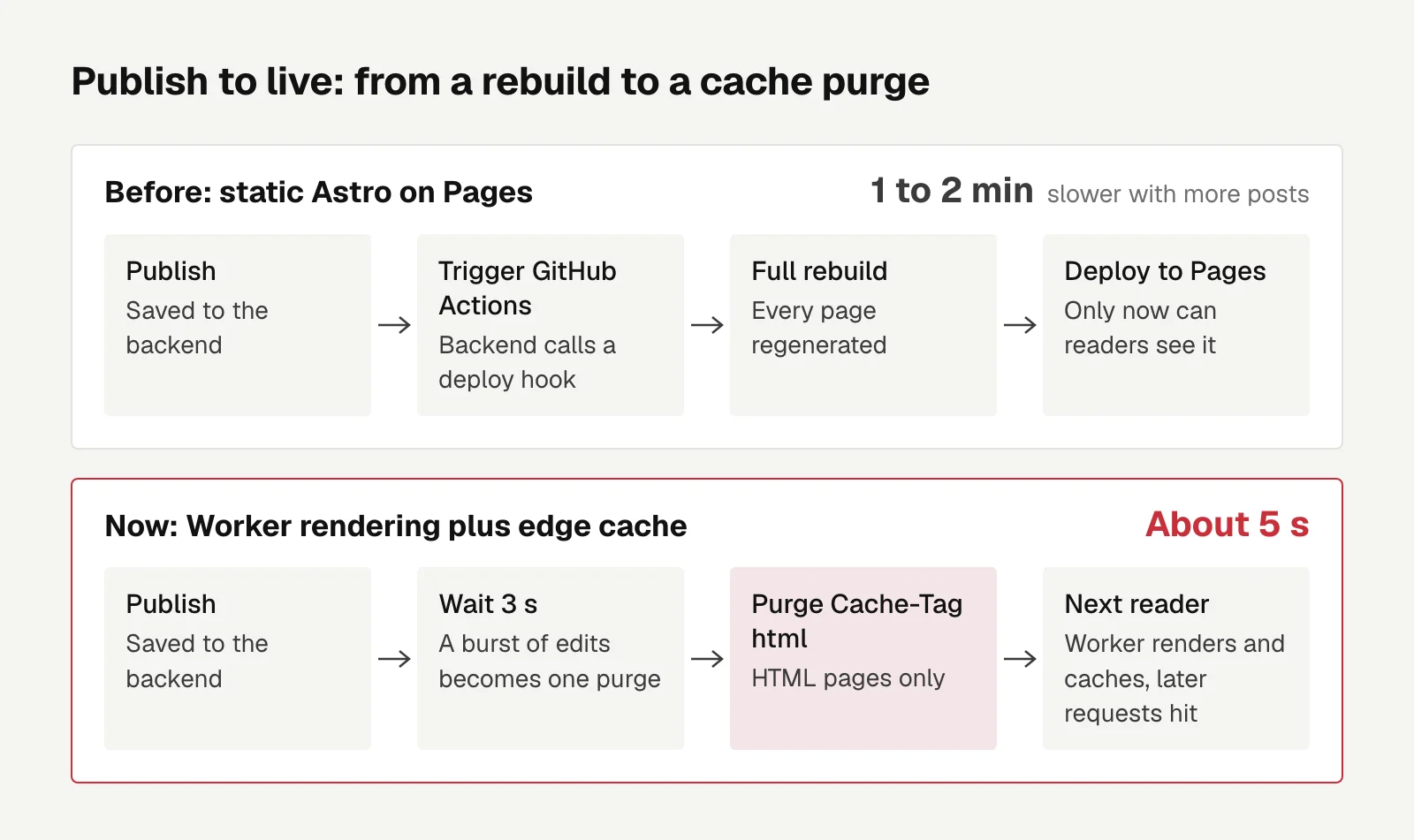
Hit publish, and this static Astro blog had to rebuild every page. Readers saw the new post 1 to 2 minutes later.
I moved it to rendering on Cloudflare Workers, with the output stored in the edge cache. Publishing now means the backend purges the cache once, and the post is live in about 5 seconds.
Median render CPU time in production is 9ms, a cache hit takes 1 to 3ms, and it still runs on the free plan.
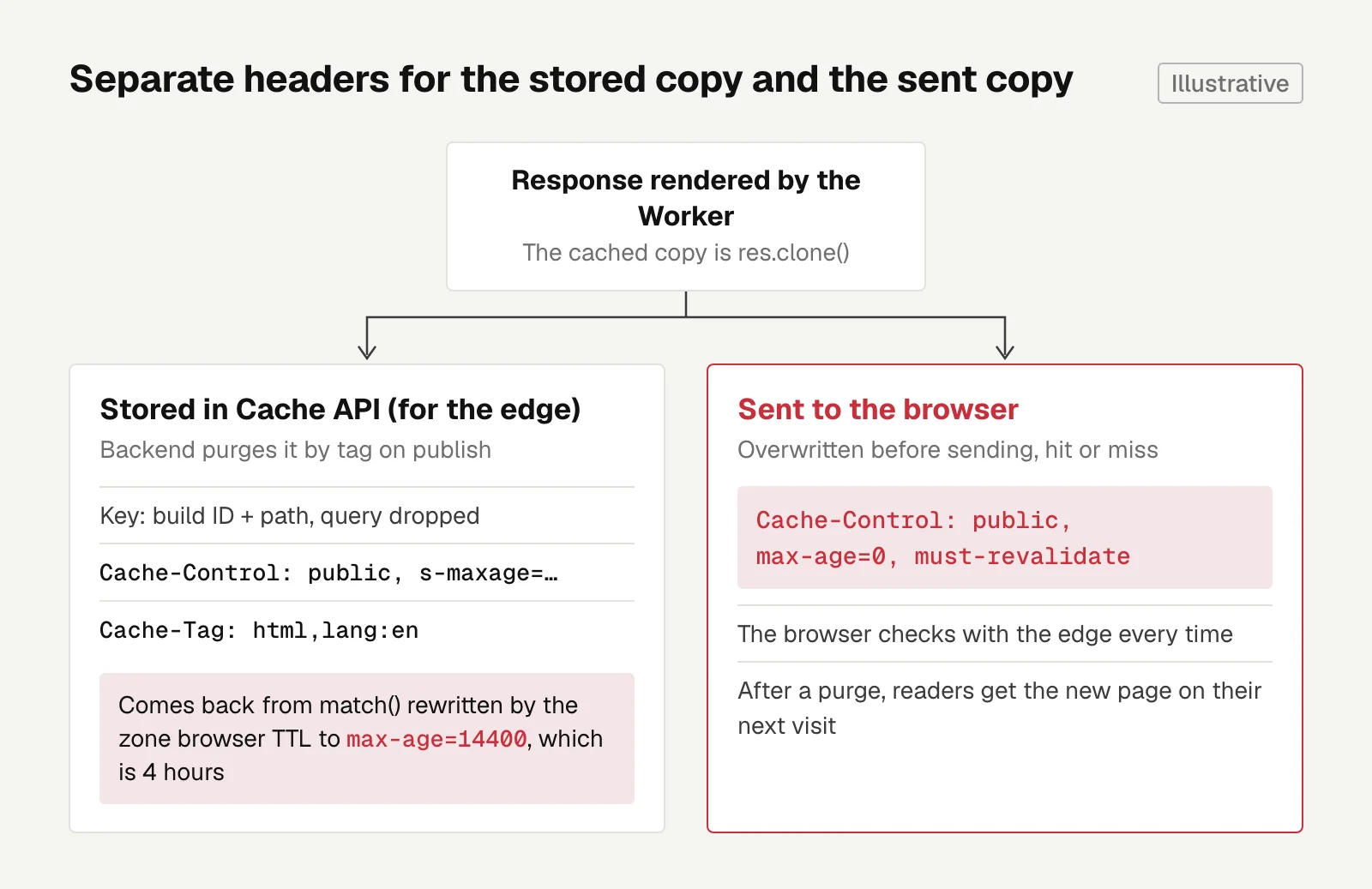
The trap that's easiest to miss: a response a Worker stores in the Cache API gets its headers rewritten by the zone's browser cache TTL.
The backend stays the CMS
The frontend was Astro on Cloudflare Pages. Posts live in a self-hosted Spring Boot and PostgreSQL backend, and I publish from my own admin panel.
Each publish made the backend kick off a full GitHub Actions rebuild, which got slower as the post count grew. What I wanted was the WordPress experience: hit publish and it's live.
I ended up having a Worker render pages on request while the backend stays on as the CMS.
The other two routes both meant rewriting a big chunk. Having the backend generate HTML directly would have meant rewriting the whole frontend. Moving all the data to D1 and R2 (Cloudflare's database and object storage) would have meant rewriting login, 2FA, comments, and push notifications.
I also considered storing rendered pages in KV, Cloudflare's key-value store, but KV takes about a minute to propagate globally, so a new post wouldn't show up right away. That got pushed to later.
Measure CPU and network with a POC
Before switching, I ran a POC on workers.dev and a temporary subdomain, then deleted both.
The Cache API does nothing on workers.dev domains, so put is a no-op there. You need your own domain to test caching.
Over 300 renders, none failed. CPU time per page render:
| Case | Render CPU time |
|---|---|
| Cache hit | 1 to 3ms |
| Local, warmed up | About 3ms |
| Production median | 9ms |
| Production p90 | 10ms |
| Production range | 4 to 46ms |
The surprise was the network. Connections from Taiwan to Cloudflare get routed to SJC (San Jose), and each call from the Worker to the backend took about 350ms.
So the post page now fetches the post list and the post body in parallel instead of one after the other.
Cache keys and Cache-Tag purges
With the Cloudflare adapter added to Astro, the home page, posts, tags, archive, RSS, sitemap, and 404 render in the Worker. The about page and the admin panel stay static.
Middleware stores rendered output in the Cache API, and three details matter:
- The cache key includes the build ID, so each deploy starts a fresh set of cache entries and old HTML never points at CSS that has already been deleted.
- The key drops the query string, so random parameters can't bust the cache.
- Stored responses carry
Cache-Tag: html,lang:<locale>so the backend can purge by tag.
The Cache API is per data center, while a purge applies globally.
Purging by tag or by URL both work on the Cache API and only hit the pages you target. Tag purges work on the free plan too.
Whenever a post is published, updated, or deleted after publishing, or a scheduled post goes live, the backend purges the html tag. It waits 3 seconds after the last trigger before sending, so a burst of edits becomes a single purge.
The Cache-Control that got rewritten
A response a Worker stores with caches.default.put() doesn't come back from match() with the same Cache-Control.
The zone's browser cache TTL, 4 hours by default, rewrites it to max-age=14400.
If you hand that straight to readers, their browsers keep the old page for 4 hours, and purging the edge cache doesn't help.
The fix is to manage the edge and the browser separately. The stored copy uses s-maxage, the lifetime only shared caches like a CDN look at, to control how long the edge keeps it.
On every response, hit or miss, the browser-facing header gets overwritten before it goes out, so the browser checks back with the edge every time. The stored copy is a clone(), so the two don't interfere.
res.headers.set('Cache-Control', 'public, s-maxage=604800') // for the edge, example value
await caches.default.put(key, res.clone())
res.headers.set('Cache-Control', 'public, max-age=0, must-revalidate') // for the browser
Results, and what's still open
For the cutover, a Worker route sits in front of Pages, and Pages stays around as a fallback: delete the route and traffic goes back to the old site.
In production, a purge took the status from HIT to MISS and back to HIT, as expected.
A few old problems went away along the way.
Two posts I had deleted were still showing up after two cache purges on Cloudflare. It turned out the Pages origin itself was serving old versions with noindex and a one-week cache, which a zone purge can't reach. After the switch to the Worker, those URLs simply return 404.
RSS used to read old markdown files in the repo, so subscribers never saw new posts. It reads from the backend now.
Search used Pagefind, whose index has to be generated at build time, so it now calls the backend's search API.
Cover images now go through Cloudflare's image transformations and are served from the same domain, so the WebGL textures on the home page don't run into CORS.
Inferring a remote image's dimensions fails inside the Worker, so the backend now reads width and height from the file header on upload. It backfilled 252 existing images and re-rendered 74 posts.
Still open: the purge goes out 3 seconds after the last trigger, and if the backend restarts within those 3 seconds, one purge gets lost.
I'm also watching CPU usage. If it goes over the limit often, the first step is adding KV for rendered pages, and only after that upgrading to the paid plan.
The biggest takeaway for me: a slow-publishing static site doesn't necessarily need a new backend. Rendering at the edge while the backend keeps its CMS role was the smallest change.

Investing
Can You Trust a Backtest? Five Pitfalls, From TradingView Understating Drawdown to Lookahead Bias
A pretty backtest doesn't prove a strategy works; these are the pitfalls I hit, from TradingView understating drawdown to missing random baselines, dirty data, short samples, and lookahead, and how I avoid each.
Letters
Loading comments…