Engineering · 2026.10.01 · 5 min · Updated 2026.10.26
Lighthouse Timing Out on a Next.js Site? The Cause Was One Unread Response Body
My mobile PageSpeed score was 46 and Lighthouse timed out on every run. The main cause was an unread body on anonymous refresh requests. After fixing it and a few other things the score hit 61, and public pages stopped checking login state.
Reading
My self-hosted OpenSEO measures pages with Lighthouse, and on my Next.js homepage it timed out on every run. My first suspect was the WebGL background.
That wasn't the main cause. When an anonymous visitor's refresh call got a 400, the frontend never read the response body. Chrome never reported that request as finished, so Lighthouse kept waiting for the network to go idle.
Reading the body, then dealing with WebGL, the LCP image, Sentry and fonts, took mobile PageSpeed from 46 to 61 and TBT from 410 ms to 30 ms. Along the way I also realized the public pages don't need to know login state at all, so the probe is gone.
The cause: an unread fetch body
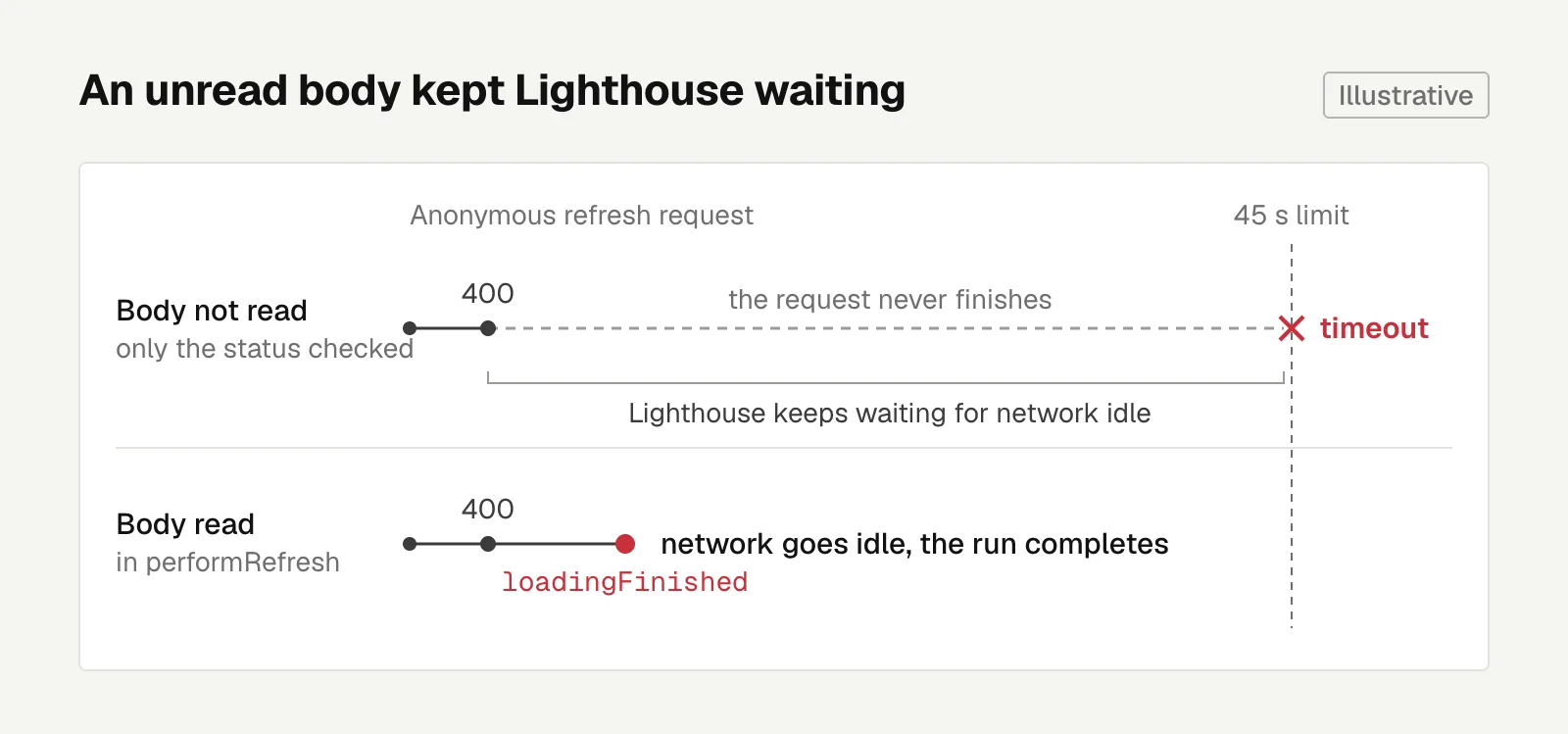
When an anonymous visitor opens a public page, the frontend calls /api/auth/refresh to try to get a new token, and the backend returns 400. The frontend looked at the status, considered it handled, and never read the body.
Users can't tell the difference, but Chrome doesn't report the request as finished.
Lighthouse waits for network idle before it considers the page loaded, and with the request still hanging, it waits until its 45-second limit.
At first I blamed the timeout on the WebGL background. At one point I declared WebGL ruled out, then took that back, and went around in a circle.
What finally settled it was testing live with CDP (Chrome DevTools Protocol, which exposes the browser's network events). I watched Network events and looked for a request that never got a loadingFinished event. Without reading the body, the event never fires. Read it, and the event shows up.
I couldn't reproduce it locally with an HTTP/1.1 fake backend no matter what I tried. It only shows up with Cloudflare in front. For network behavior you can't reproduce locally, watch the events with CDP in the real environment.
The fix was reading the body in performRefresh.
Once fetch returns a response, read the body even if you don't need it.
WebGL, the LCP image, Sentry, and fonts
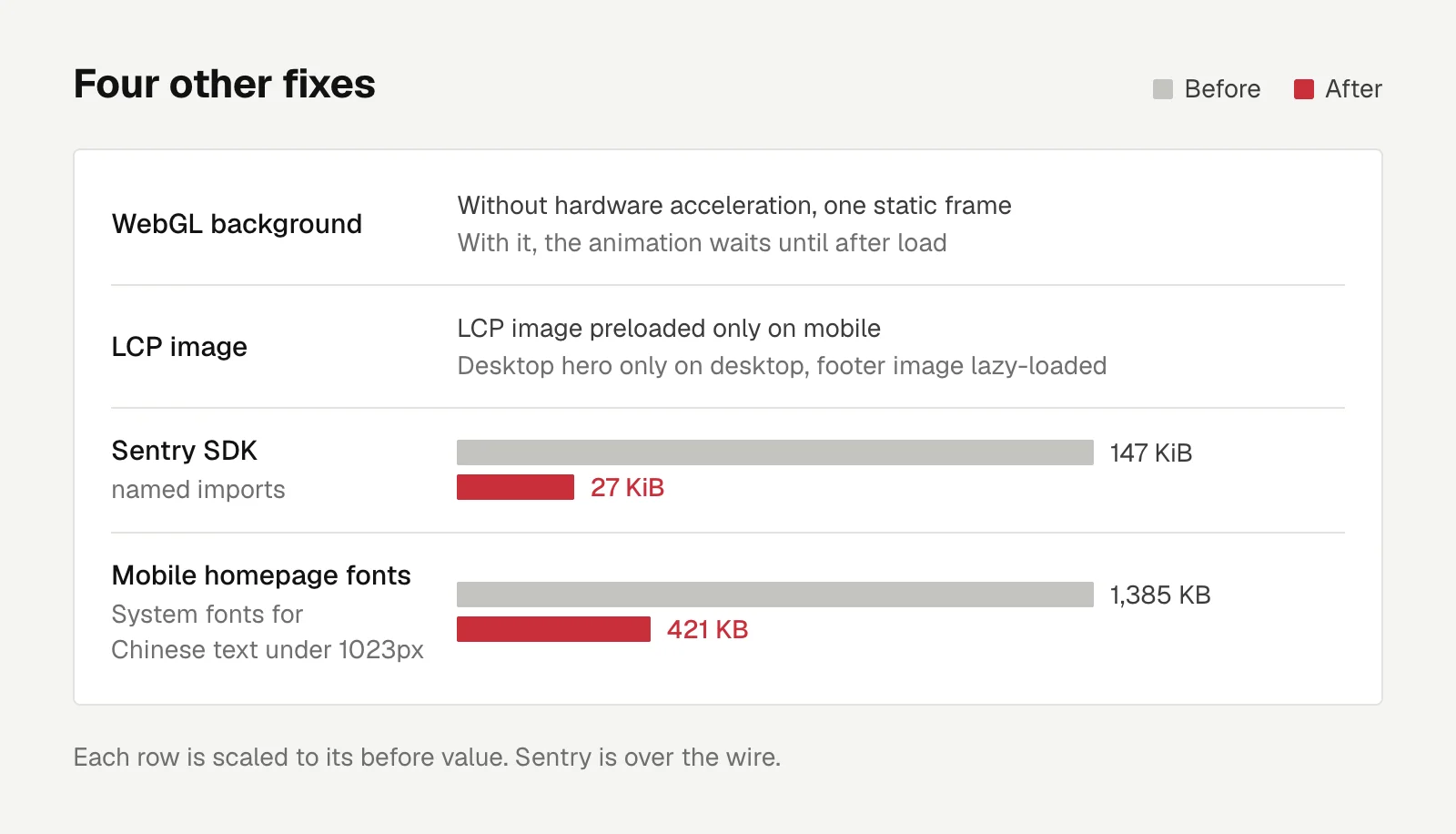
Without a GPU, the WebGL background renders on the CPU. Now it draws a single static frame when there's no hardware acceleration. With acceleration, the animation waits until after load, so it doesn't compete with the first screen for the main thread.
On mobile, the LCP element (Largest Contentful Paint, the biggest piece of content in the first screen) was a CSS background image. The browser only discovered it after parsing the CSS, while the hidden desktop hero image and the footer image were being preloaded.
Now the LCP image is preloaded only on mobile, the desktop hero only downloads on desktop, and the footer image is lazy-loaded.
The Sentry SDK was loaded with a dynamic import and came in whole, 147 KiB over the wire. Named imports of just the parts I need brought it down to 27 KiB.
Font downloads on the Traditional Chinese pages totaled 1.39 MB, with Noto Sans TC accounting for 964 KB. Dropping weights didn't help, since 400, 500 and 700 share the same variable font files.
Switching the whole site to system fonts would save the most, but it would change how desktop looks. In the end, only body text on Traditional Chinese pages narrower than 1023px uses system fonts. Desktop and English pages are unchanged.
Font downloads on the mobile homepage went from 1,385 KB to 421 KB.
PageSpeed from 46 to 61
Rerunning mobile PageSpeed on the homepage after deploying. TBT is the total time the main thread was blocked by long tasks and couldn't respond to input:
| Metric | Before | After |
|---|---|---|
| Performance | 46 | 61 |
| FCP | 9.7 s | 5.0 s |
| LCP | 14.5 s | 9.0 s |
| TBT | 410 ms | 30 ms |
| Best Practices | 96 | 100 |
The score changes on every run. Lighthouse's simulated FCP jumps between 2 s and 9.7 s, and if the fonts finish downloading before first paint, they get counted as render-blocking resources. A single run is easy to misread.
Google doesn't have real-user data for ezlo.me yet, so this score doesn't affect ranking right now. The real gains this time were that the measuring tool can finally produce a number, and faster load times on phones.
Performance problems are often several things stacked together. Fix the measurement first so it produces a number, then take the problems apart one at a time.
Public pages stopped probing /me
While fixing refresh, another problem surfaced. Every public page probed /me on mount to decide whether the top-right corner showed "Log in" or an avatar.
The JWT cookie is HttpOnly and set on the API domain, so the frontend can't read it and only finds out by making the call.
Anonymous visitors are the vast majority, so that came to 4 extra requests per page in exchange for one icon in the corner.
I changed direction three times. First I added a localStorage "has logged in before" flag. Then I noticed the site has no way to change your avatar anyway. Only after that did I realize the homepage doesn't need to know login state at all.
The final design: the top-right of every public page always shows "Log in". Clicking it goes to the login page, which probes /me and sends users who are already logged in straight to the dashboard.
The login page takes a next parameter for where to go after login, but only accepts on-site paths under /dashboard. External URLs, protocol-relative forms like //host and paths containing .. all fall back to the dashboard home, so the parameter can't become an open redirect to another site.
I also considered having the backend add a session endpoint that always returns 200. That's still an extra request, though, and it would mean changing the backend.
After the change, an anonymous visitor opening the homepage triggers only three public API requests, with no console errors.
Looking back, the first version's flag plus avatar was building machinery for a feature nobody needed. Before adding a mechanism, check whether the feature needs to exist.

Engineering
SEO for a New Domain: Checking Search Volume With Self-Hosted OpenSEO Before Writing Long-Tail Guides
A new domain whose brand name is taken can only win long-tail traffic with guides. I ranked topics by OpenSEO search volume, checked each claim against primary sources, and loaded GA4 only on public pages.
Letters
Loading comments…