Tools · 2026.09.29 · 4 min · Updated 2026.10.26
Running Two LINE Accounts on One iPhone With LiveContainer: Three Free Apple ID Pitfalls
How I run a second LINE account on one iPhone with LiveContainer and SideStore, and how I got past running out of free App IDs, SideStore login failures, and Shortcut refresh errors.
Reading
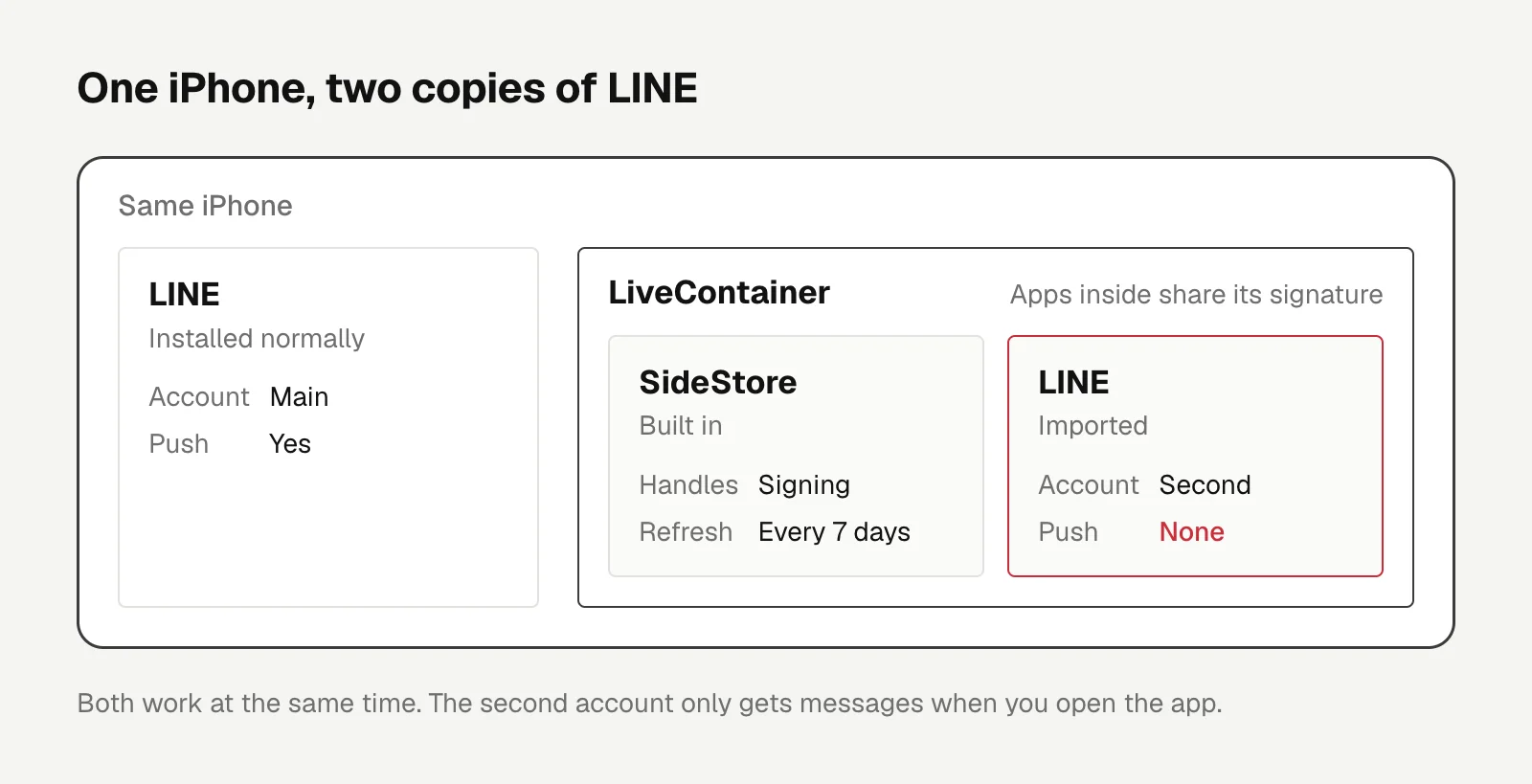
The normally installed LINE runs my main account, a second copy inside LiveContainer runs the other one, and both work at the same time on one iPhone.
With only a free Apple ID, you'll hit three pitfalls:
- Sideloading LINE directly uses up your App IDs, so import it into LiveContainer instead.
- SideStore login failures come from an outdated version, and switching anisette servers won't help.
- When the Shortcut refresh throws "You are not signed in", reinstall once from the built-in SideStore.
Also, the second account gets no push notifications. Messages only come in when you open the app.
To be clear up front, neither sideloading nor running multiple copies is officially supported by Apple or LINE, and LINE may detect a non-genuine environment and block it. If you follow along, that's your own call.
The tool is iloader 2.3.4 on the Mac, which installs LiveContainer+SideStore (LC+SS from here on) onto the phone. The official LiveContainer + SideStore installation guide covers how to install LC+SS.
LiveContainer can run other apps inside itself, and the built-in SideStore handles signing and refreshing every 7 days. LocalDevVPN has to be on during a refresh.
Running out of free App IDs
At first I tried to install LINE directly with iloader, and it failed:
Not enough available app IDs. 8 are required, but only 3 are available.
A free account can only create 10 App IDs every 7 days, and the app itself plus each of its extensions takes one. Importing LINE into LiveContainer avoids the problem:
| Install method | App IDs used |
|---|---|
| Sideload LINE directly with iloader | 8, with only 3 left at the time |
| Import into LiveContainer | No additional ones |
Apps inside LiveContainer share its signature, so they don't use any more App IDs, and they don't count against the free account's limit of 3 apps.
Since then I run every other app inside LiveContainer too.
Used App IDs take 7 days to free up, so check how many are left before installing anything else.
SideStore login fails: check the version
The first LC+SS I installed came with SideStore 0.6.4, and logging in kept failing with "The data couldn't be read because it isn't in the correct format."
Switching anisette servers (which supply the device data Apple's login expects) and Reset adi.pb made no difference.
The cause was on Apple's side. In late August 2026 Apple changed its server-side login flow, and every SideStore version up to 0.6.4 throws this error. It was fixed in 0.7.0.
There were some changes from apple server side which broke 0.6.4 and prior versions and prevent them from signing into sidestore.
That's from the release notes for SideStore 0.7.0-alpha.
After I used iloader to install the LiveContainer nightly build instead (LC 3.8.10, SS 0.7.0-20260918), I could log in.
Shortcut refresh: "You are not signed in"
The refresh is chained together in a Shortcut: turn on LocalDevVPN, Refresh All Apps, turn off LocalDevVPN.
At Refresh All Apps it threw "You are not signed in", and the error log showed SideStore.OperationError 28.
The cause is that iloader doesn't sign LC+SS completely.
The fix comes from LiveContainer #1629 and SideStore #1584. In the built-in SideStore, use + to reinstall the nightly IPA, don't tap Resign, and choose "Keep App Extensions (Use Main Profile)" for extensions.
That keeps the extensions LiveContainer needs for multitasking and doesn't use up any extra App IDs.
When I did it, it got stuck at the last step twice in a row: the progress bar filled up and kept spinning, with no new errors in the log. After restarting the phone it was fine.
While the install hadn't finished, the existing LiveContainer and LINE weren't affected.
Auto-refresh isn't fully verified yet. I still need to confirm the Shortcut succeeds on its own after LiveContainer has been swiped out of the background.
Until then, my workaround is to open LiveContainer before running the Shortcut, go into SideStore once, and leave it in the background.
No push, and the other risks
The second account gets no push notifications for two reasons.
The APNs device token is tied to the bundle ID, and LINE's servers only push to the genuine jp.naver.line. LiveContainer also doesn't install an app's extensions; see LiveContainer #492 and #265.
Decrypted LINE IPAs shared by other people are out there online, but LINE holds my accounts and chat history, so a modified build is too risky.
The tools to decrypt it yourself need TrollStore or a jailbreak, and neither works on iOS 26 or later.
The remaining risk is that nightly builds aren't stable, and a future update might mean reinstalling again.

Tools
GPT as a Read-Only Reviewer for Claude Code: Adversarial Review With Pi
I wrapped Pi, connected to GPT models over an API, as a read-only reviewer Claude Code can call, and found out why permission rules can't stop file writes and how adversarial review converges.
Letters
Loading comments…