Engineering · 2026.09.30 · 6 min · Updated 2026.10.26
Auto-Approving muse.ai Cards With a Chrome Extension: From Allow-All to a Trust List
My Chrome extension clicks Allow on muse.ai approval cards that stall overnight scheduled tasks, and once other people used it, it moved to a trust list with irreversible actions like posting handled separately.
Reading

A muse.ai task scheduled for the middle of the night sat on one approval card: the assistant Ren wanted to open a new website, and nothing moved until someone clicked Allow.
muse.ai is Meta's personal AI agent. I wrote a Chrome extension, Auto Approve for Muse, to click it for me. It later went up on the Chrome Web Store, and the source is on GitHub.
Clicking everything was fine while I was the only user. For other people it isn't, because that removes the human check muse was designed around.
So 1.1.0 only auto-allows trusted sites, and 1.2.0 separates actions you can't take back, like posting or sending messages, from sites. Even "auto-allow everything" doesn't click those by default.
Why click buttons in the browser
muse's own settings can't solve this. The most permissive network access setting still asks before some actions, and there's no "never ask".
You also can't add trusted sites by hand. They only build up as you click "Always allow" on approvals.
There's an existing tool on GitHub that reverse-engineers muse's encrypted RPC to call the approval directly. I tried it in Docker, the daemon kept crash-looping, and I ended up deleting the whole thing.
Clicking the button in the browser UI goes down the same path as a human click, with no need to touch the internal protocol. The cost is that if a muse update changes the UI, the detection may stop working.
Working backward from Deny
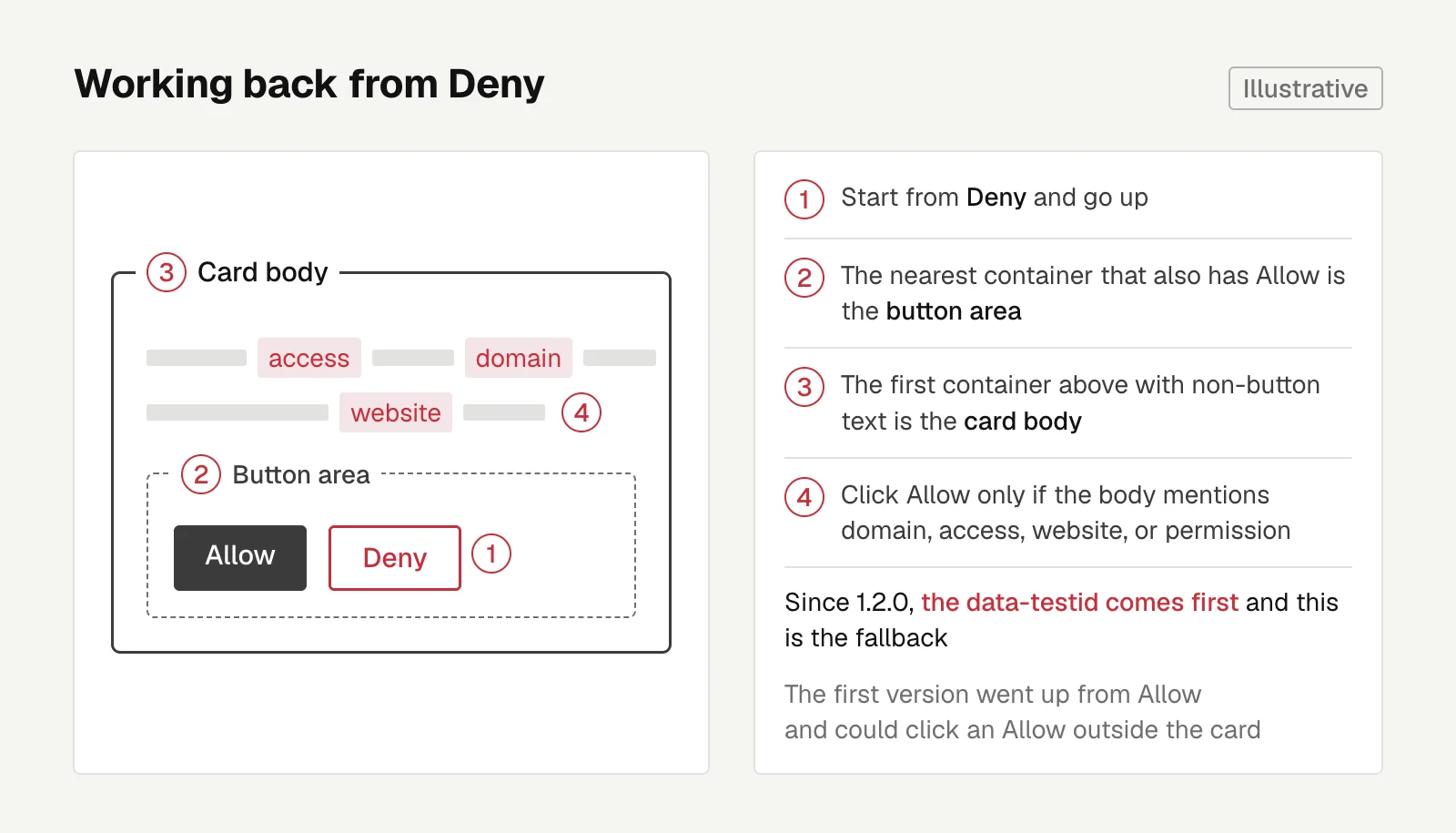
The first version searched upward from the Allow button for context. While writing jsdom tests (jsdom simulates a browser DOM in Node.js), I found it would click an Allow outside the card.
Write jsdom scenario tests before trying the real page. This bug was caught by a test first.
I switched to working backward from Deny. It goes up to the nearest container that also has an Allow button and treats that as the button area, then up to the first container with non-button text, which becomes the card body.
It only clicks if the body mentions words like domain, access, website, or permission. Dialogs that also have a confirm button, like a delete confirmation, don't get clicked by mistake.
Later I noticed in DevTools that muse tags approval cards with data-testid="hatch-inline-approval-card". 1.2.0 looks for that marker first and only falls back to the old detection when it can't find it.
Scheduled tasks often run in a secondary chat, and an approval from another chat shows up on the current screen only as a "One task needs review" notice.
In that case the extension clicks Review first, the full card appears in the right-hand panel, and it clicks Allow on the next pass.
From allow-all to a trust list
Once it was on the store, the users were ordinary people. I couldn't expect them to understand domains or wildcards, or make them configure a bunch of things right after installing. The 1.1.0 flow:
- The first time a new site comes up, it doesn't click, and the toolbar icon shows a red badge count.
- Open the popup, pick a trust scope, and click Allow. The card gets approved right away, and the same request is auto-allowed from then on.
- A new install opens a welcome page that asks one question: only allow what I trust, or auto-allow everything. People upgrading from 1.0 stay on allow-everything.
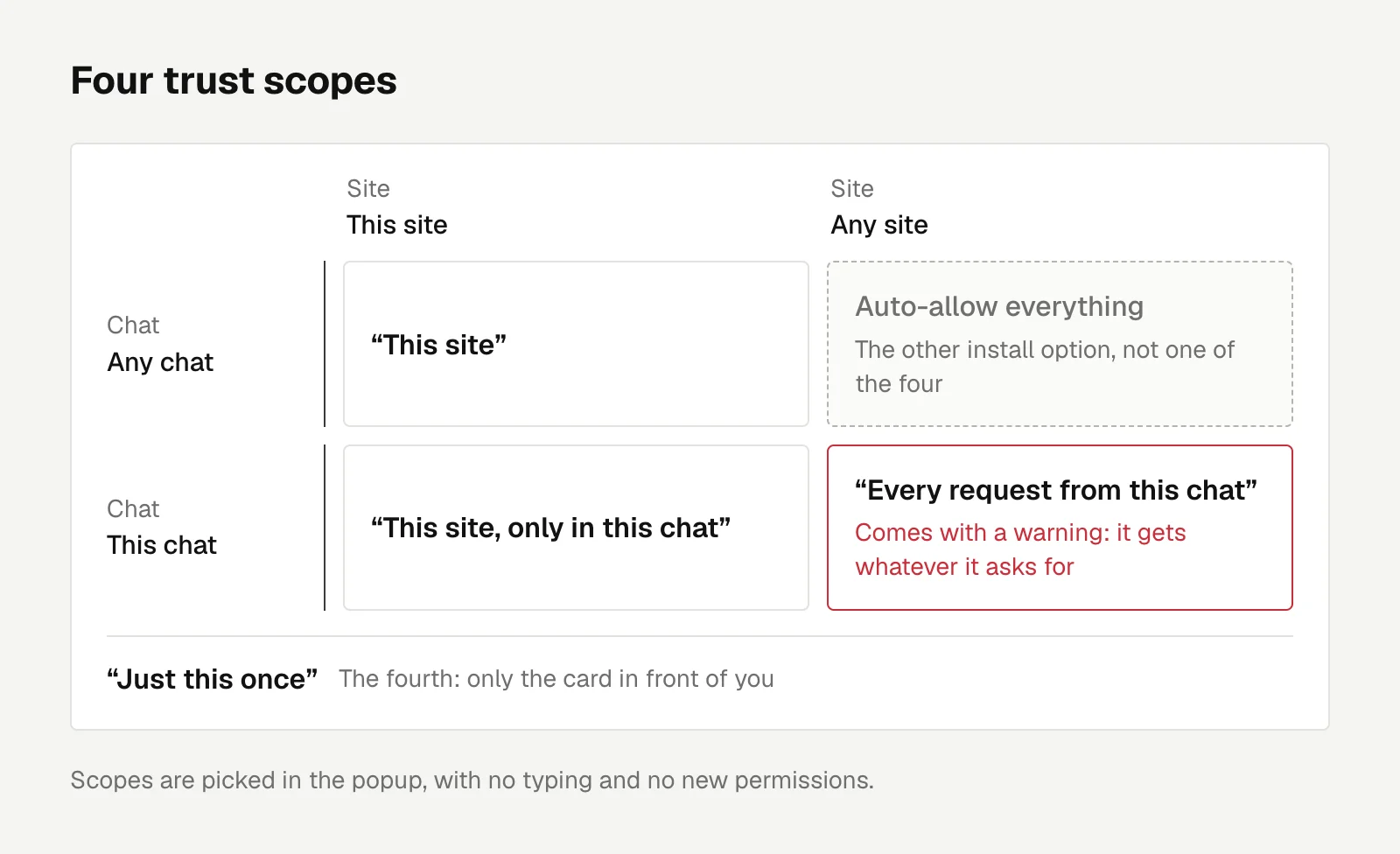
There are four trust scopes: this site, this site only in this chat, every request from this chat, and just this once.
The third one comes with an orange warning, because that chat gets whatever it asks for. The whole flow needs no typing and adds no new permissions.
Posts can't be taken back
After 1.1.0 shipped, I tested it myself and got a card saying "Allow Ren to post this content to Threads". The extension didn't react at all.
It only recognized site-access cards, and the text on cards for posting or sending messages has none of those keywords.
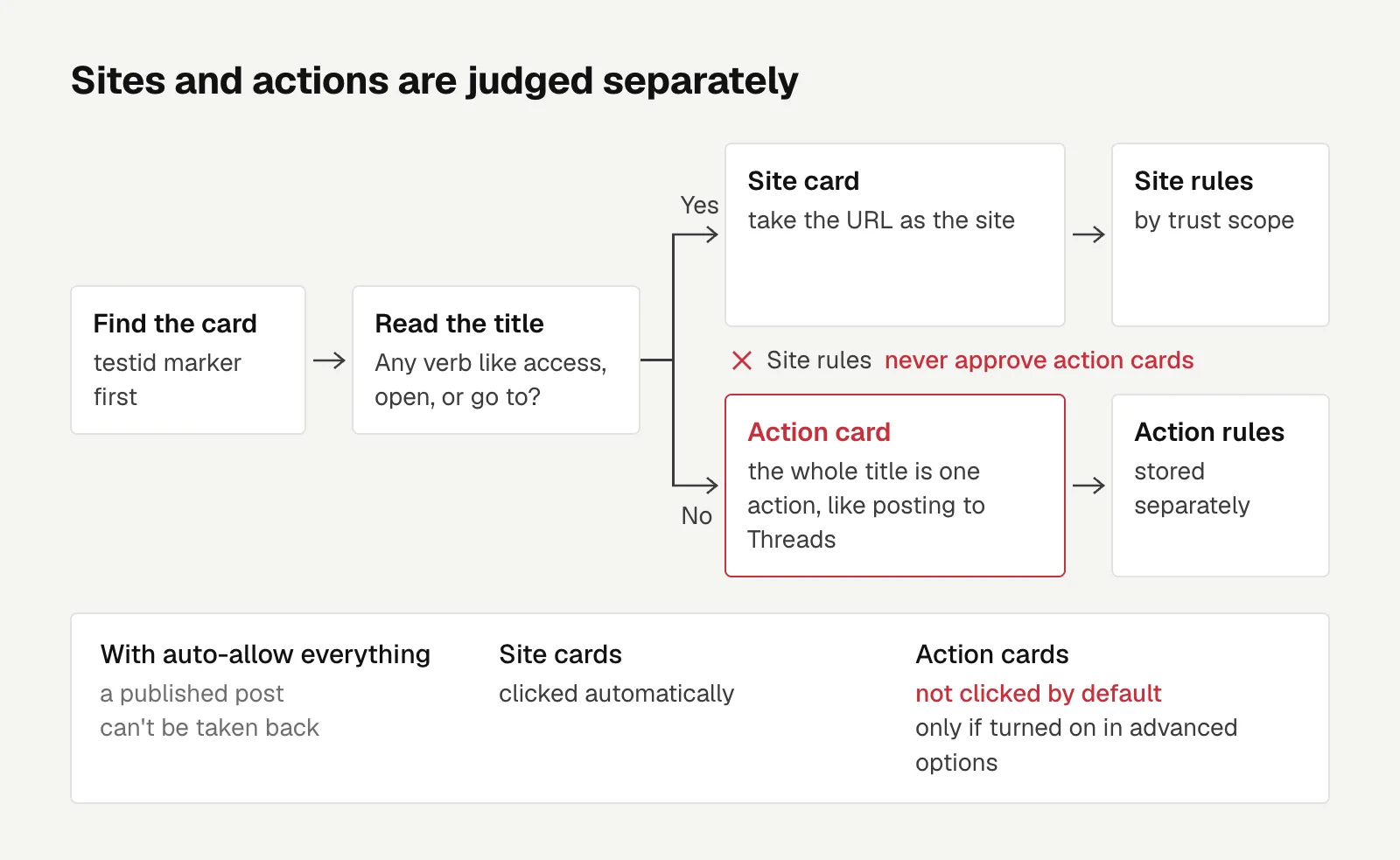
In 1.2.0, once it finds the card by testid, it reads the title. If it has a verb like access, open, or go to, it takes the URL as the site. If not, the whole title is treated as one action, with its rules stored separately, and site rules never approve action cards.
"Auto-allow everything" doesn't click action cards by default. You have to turn that on under the advanced options.
A published post can't be taken back. Someone who picked allow-everything didn't want to manage sites, which doesn't mean they agreed to let the extension post for them.
Matching actions by title is also crude. Once you trust "post to Threads", it gets approved no matter what the content is or which account it goes to, and the limitations section of the README says so.
Always on, and the remaining risks
To keep it clicking while my computer is off, I load the same extension in a linuxserver/chromium container on an always-on host. That image's web GUI includes a terminal with passwordless sudo:
Keep in mind the web interface includes a terminal with passwordless
sudo, anyone who can reach the GUI can gain root inside the container.
That's from the linuxserver chromium image docs. So the port binds only to 127.0.0.1, and I view the screen through an SSH tunnel.
One more development catch: an unpacked extension loaded with --load-extension gets install in onInstalled every time the browser restarts, never update.
Telling a new install from an upgrade has to be based on stored data. If there are 1.0 settings, migrate them. Only treat it as a new install when there's no mode setting and the welcome page has never been opened.
Approval cards exist so a person confirms where the agent is going and what it's about to do. Auto-clicking them hands that confirmation to a set of rules, and the README says this right at the top.
What I can do is narrow what gets auto-approved and keep irreversible actions separate from sites.
The other risk is that it depends heavily on muse's UI, and so far it has only been tested on the Traditional Chinese interface.

Engineering
SaaS Billing After Performance Fees: Plan Limits, Promotions, and Suspension in a Flat Subscription
My auto-lending SaaS moved from performance fees to subscriptions. Plan limits shipped before billing, promo bonuses freeze onto the invoice, the 30-day notice only gates passive charges, and suspension never touches users' lending toggles.
Letters
Loading comments…