Tools · 2026.10.04 · 7 min · Updated 2026.10.26
Clickable Bands in Claude Code Mods: API Limits Shape the Design, and What leftovers Still Can't See
After shipping my Claude Code mods, I made the bands clickable within limits like uncolorable Buttons and hover misclicks, taught leftovers absolute paths and variable substitution, and listed what command matching still misses.
Reading

The leftovers band only said "● 2 not cleaned up". It didn't show which two, and dealing with them meant typing /leftovers separately.
Making that band something you can act on directly runs into the limits of this version of the API: a Button can't be colored, and expanding on hover shifts the rows. A lot of the design was decided by those limits.
The other takeaway is a blind spot in leftovers. It works out what was left behind by matching Bash commands, so it can't see anything done inside a script or a tool. That can only be covered by checking after the fact.
I started reworking the band on the same day the first version of the five Claude Code mods I built from a month of session logs shipped. The band is the strip right above the prompt input, shared by every mod; the mods interface docs cover how to draw in it.
The problems I ran into in use were concrete. Besides the vague count, your-turn only showed the first item when several were pending, and the leftovers ledger was holding on to worktrees that no longer existed.
A clickable band, shaped by API limits
The first version of leftovers had a pane for the list, but where a pane goes is up to Claude Code, and the mod can't choose. In fullscreen with a window at least 110 columns wide it docks on the right, otherwise it's embedded above the prompt.
After trying it I gave up on the pane and drew the list in the output of /leftovers instead.
When the pane had focus, pressing 1 was the same as pressing Clean up on the first item. That was far too easy to hit by accident, so the number hotkeys went too.
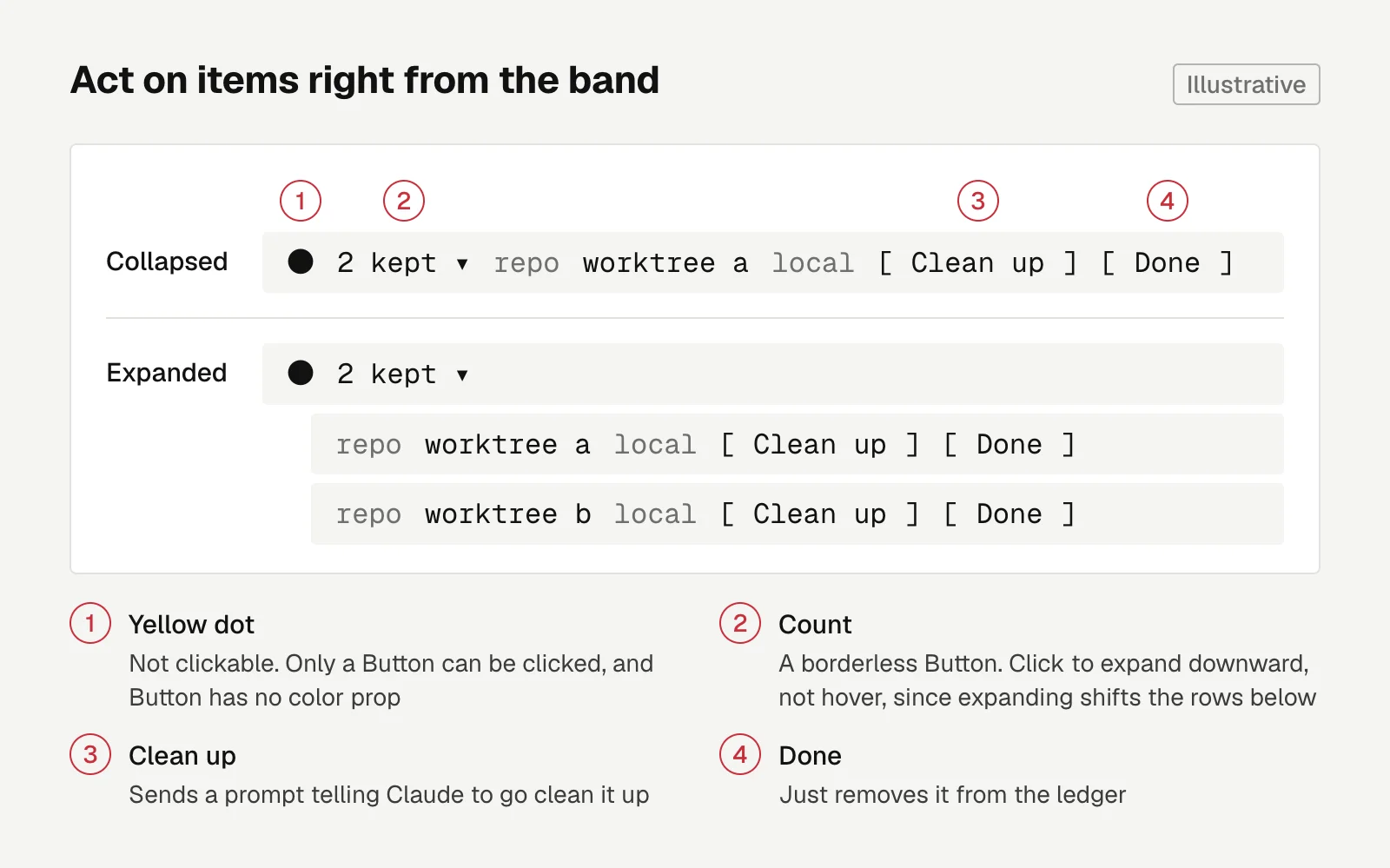
The new version draws the first item and its buttons right on the band:
● 2 kept ▾ repo <repo>/.claude/worktrees/a local [ Clean up ] [ Done ]
2 waiting on you ▾ Revoke the old OAuth grant in the admin console 5m [ Done ]
Clean up sends a prompt telling Claude to go clean it up. Done just removes it from the ledger.
When there's more than one item, the count text turns into a borderless Button. Click it and the list expands downward, one row per item, each with its own buttons.
A few trade-offs:
- Expand on click, not on hover. Expanding shifts the rows below, so whatever is under the mouse changes to a different item, and it's easy to click the wrong one.
- The yellow dot isn't clickable. In this version of the API only a Button can be clicked, and Button has no color prop. I kept the yellow, and the clickable part is the text right next to it.
- The band text changed from "2 not cleaned up" to "2 kept". In Chinese, the original wording reads at first glance as "2 confiscated".
your-turngives its hotkey only to the top item. Rows sharing one hotkey fight over it, and whichever is drawn last wins.
Color needed workarounds too. Button has no color prop, so all you can set is the style for when the row it sits in is hovered.
That's why the your-turn count stays visible in aqua all the time, while the green of Done and the yellow of Clean up only show up when the mouse is over that row. Clean up changes things, so it gets yellow.
To color the count, it can't be inside a Button, so I split it into two Buttons with a Text in between. The side effect is that clicking the number itself does nothing.
One more prerequisite: these buttons can only be clicked in fullscreen mode, because the default view doesn't turn on mouse reporting.
If you stay in the default view, press ctrl+x then tab to move focus to the band, tab to pick a button, and Enter to press it.
your-turn: cross items off on reply
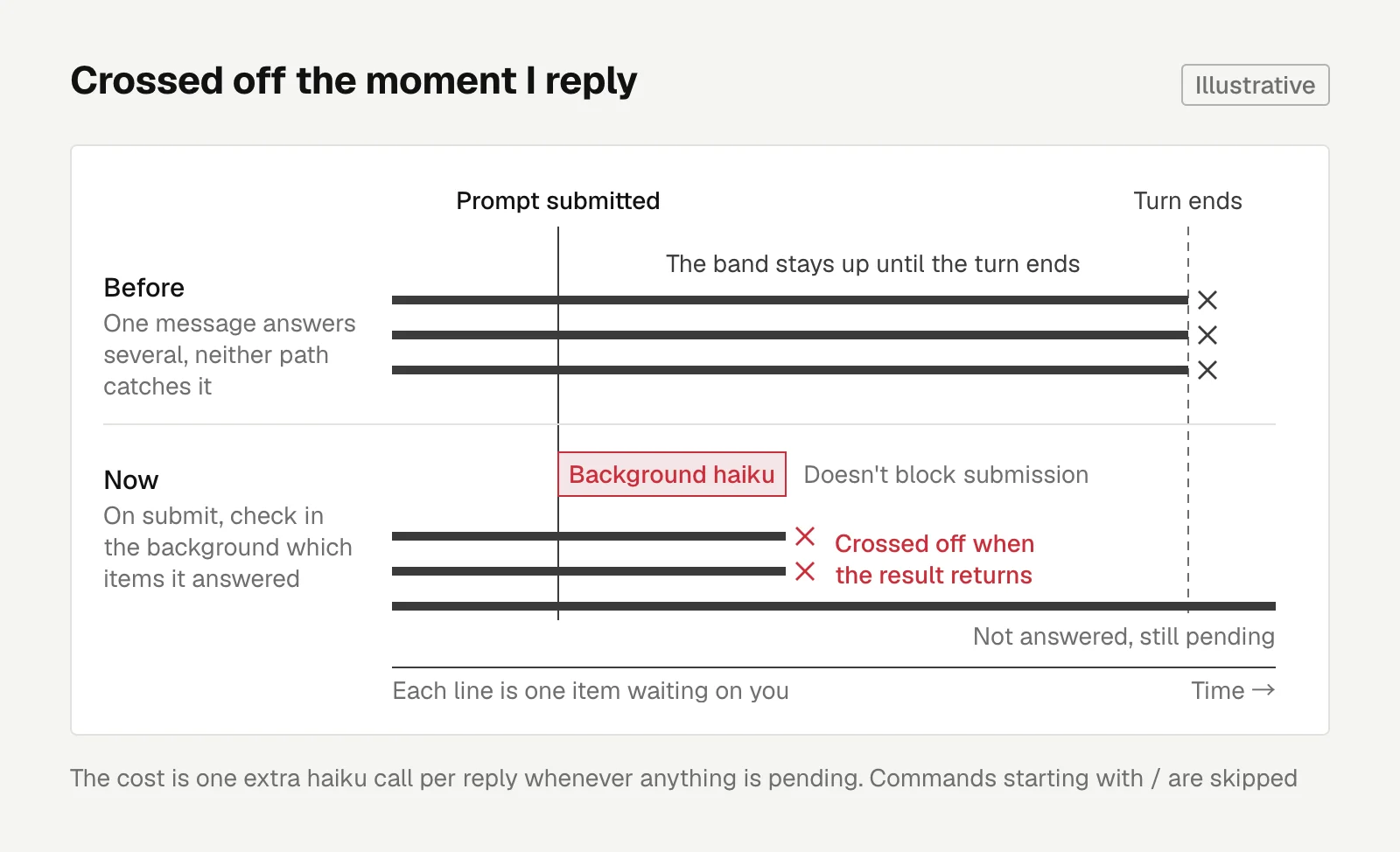
your-turn originally had only two ways to cross something off. One was replying with something like "done" when only one item was pending. The other was the extraction at the end of a turn.
With three items pending, I'd answer several in one message. Neither path would catch it, and the band stayed up until the turn ended.
The fix: whenever something is pending when I submit a prompt, the mod makes one haiku call in the background to work out which items the message answered. It crosses them off when the result comes back. Mods can call a model on their own for small jobs like this kind of classification.
The check doesn't block submission, and commands starting with / are skipped.
The cost is one extra haiku call per reply whenever anything is pending.
Two ways leftovers got it wrong
Two worktrees were stuck in the ledger. Their PRs had been merged and the directories cleaned up, but the band still showed them.
There were two reasons. The worktrees were removed at the end of the script I use to merge PRs, and leftovers only recognizes git worktree remove when it appears directly in a Bash command.
On top of that, the ledger recorded the relative path from the command. The ledger is shared across sessions, so there was no way to tell afterward which repo it belonged to.
So the paths for git worktree add / remove are now joined to the working directory from before the command ran, with cd and git -C taken into account.
The working directory has to be read before the command runs. By the time it finishes, it may have changed.
Also, at the end of every turn and at session start, the mod uses $.fs.exists to check whether the directory is still there, and drops it from the ledger if not.
That also handles false records. When a git worktree add inside a test string gets recorded as a real command, it disappears on its own at the end of the turn because the directory doesn't exist.
The second case is shell variables. Claude first saved a plist path into a variable P, then ran launchctl bootstrap gui/$(id -u) $P. The band showed "1 kept launchd $P local", and the suggested cleanup command was wrong as well.
The fix: when detecting commands, each segment first gets the currently known variables substituted in. If a whole segment is NAME=value (optionally with export), it goes into the variable table instead of being treated as a command.
This check runs after ssh host is stripped off, so variables set on the remote side get picked up too.
Variables that already exist in the environment, like $HOME, are deliberately left alone. The remote and local $HOME aren't the same, and guessing wrong is worse than leaving it as is.
This version is pushed to the public repo (3c7b247).
What command matching can't see
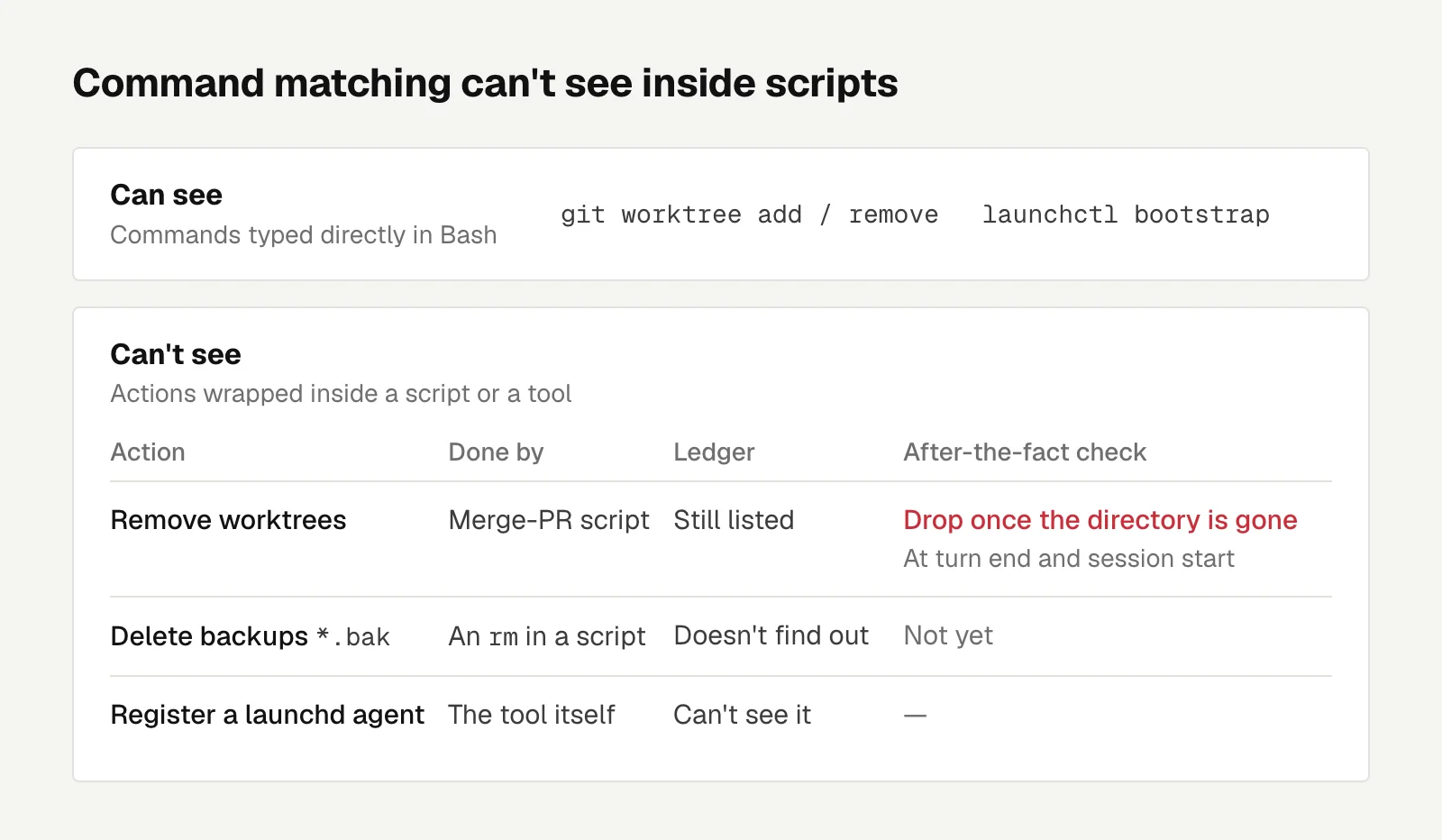
At this point leftovers has two known blind spots.
When a backup file (*.bak) is deleted by an rm inside a script, the ledger doesn't find out. And some tools register a launchd agent on their own instead of through a launchctl typed directly in Bash, which leftovers can't see either.
This is the same kind of problem as cleaning up worktrees in a script. Matching Bash commands only sees what's typed out directly, and anything wrapped inside a script or a tool is invisible.
Worktrees got an after-the-fact check through dropping them once the directory is gone. Backup files don't have one yet. I'll deal with that when it comes up.
Engineering
React Number Input Pitfalls: Clearing Saves 0, Typing e in type=number Empties It
Clearing the reserve field on my lending settings page silently saved 0; this covers string drafts, checking upper and lower bounds differently, the e key in type=number, and per-keystroke input jsdom can't test.
Letters
Loading comments…