Engineering · 2026.10.03 · 6 min · Updated 2026.10.26
React Number Input Pitfalls: Clearing Saves 0, Typing e in type=number Empties It
Clearing the reserve field on my lending settings page silently saved 0; this covers string drafts, checking upper and lower bounds differently, the e key in type=number, and per-keystroke input jsdom can't test.
Reading

Clear a number input in a React form and hit save, and what gets stored can be 0. On my lending settings page, clearing the reserve field quietly stored 0, which means lending out all of your funds.
The fix was to have the form's draft hold what the user typed and parse it only on save.
The same form had two more traps. The upper bound should be enforced as you type, while the lower bound can only be checked on save. And typing e into a type="number" input turns its current value into an empty string.
More than 2,600 passing unit tests couldn't reveal that last one. I only found it by typing one character at a time in a real browser.
I ran into these while fixing a different batch of frontend issues. All of them were in the form where users set "how much money to keep out of lending" and "the longest tenor to lend for."
Clearing becomes 0, which means lending everything
The reserve input treated a cleared field, a typo, and a negative number all as 0, without saying a word.
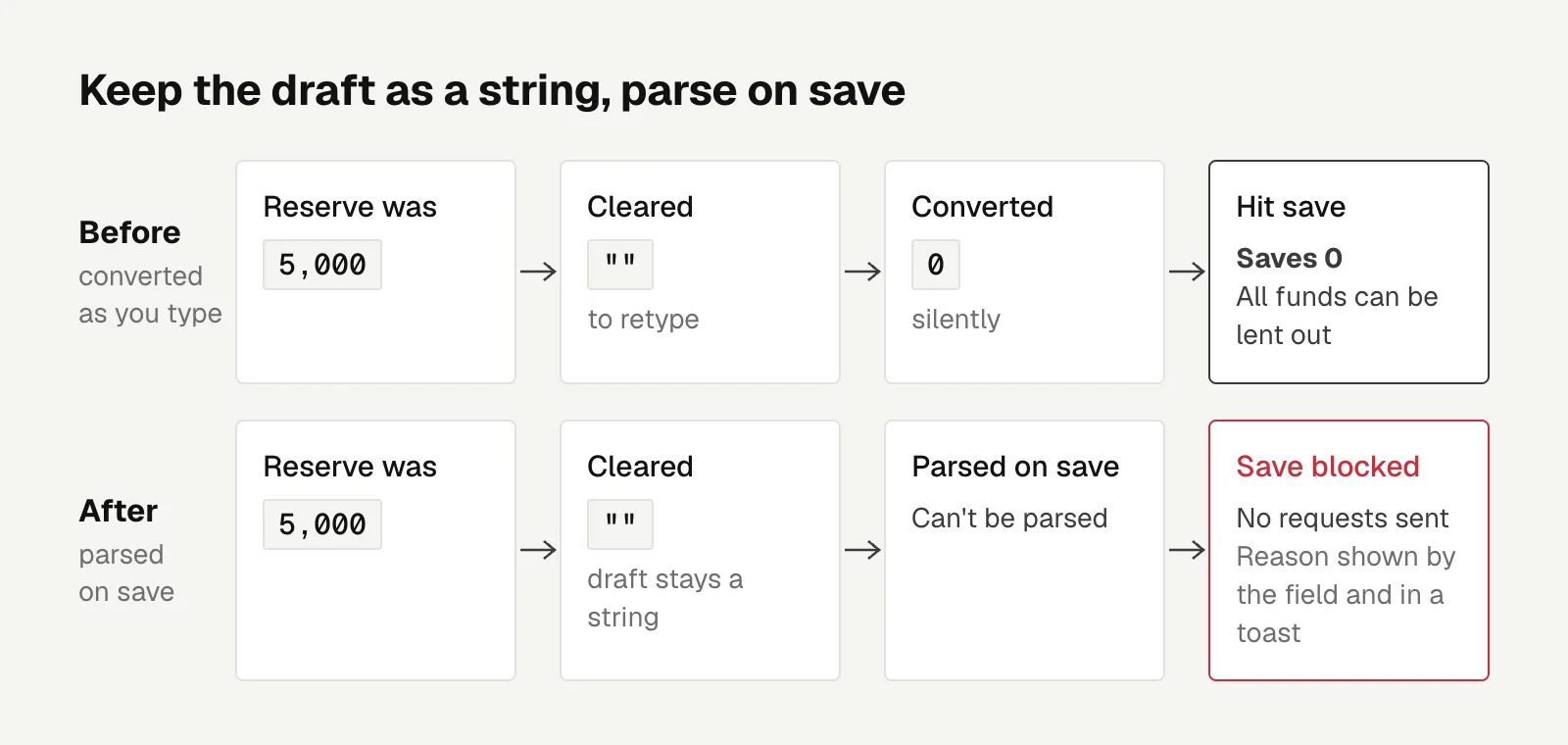
Say someone had a reserve of 5,000, cleared the field to retype it, and hit save by accident first. What gets saved is 0, meaning all of their funds can be lent out.
I didn't grasp how serious this was at first either, not until I walked through that concrete example.
In a typical form, an empty value turning into 0 is a minor flaw. In lending settings, 0 is a meaningful and very aggressive value. Whether a value is dangerous depends on the domain, and an empty value in a field like this has to be blocked.
The root cause was that the form converted text to a number as you typed, and an empty string converts to 0. Here an empty string means the user hasn't finished typing, so it can't become 0.
The fix was to store the draft state as a string and parse it only on save. If it can't be parsed, the save is blocked, no requests go out, and the reason is shown next to the field and in a toast.
The message next to the field only appears after the user has pressed save once; otherwise they'd get scolded halfway through typing.
The snapshot read back from the DB is still a number, so the logic that works out which requests to send didn't need to change at all. Only the draft layer switched to strings.
The reserve also had no upper limit. The DB column is NUMERIC(20,8) (total digits, then decimal places). Anything at 1e12 or above passed backend validation and only failed with a 500 on write.
I set the limit at 1 billion with at most 8 decimal places, which fits the column and is far more than anyone will actually use. Backend validation returns 400 above that, and the frontend range lives in a file shared by onboarding and the lending settings page.
The number is written once on each side, so changing one means changing the other.
Upper bound on keystroke, lower bound on save
Tenor was a different problem. Onboarding accepts any number of days from 2 to 120, but the lending settings page only had six chips.
Someone who entered 45 days during onboarding couldn't find a matching option on the settings page. So I added an input field there too, kept the chips as shortcuts for common tenors, and had both read and write the same value.
After the first version went to STG (staging), I typed 999 into the days field and it accepted it.
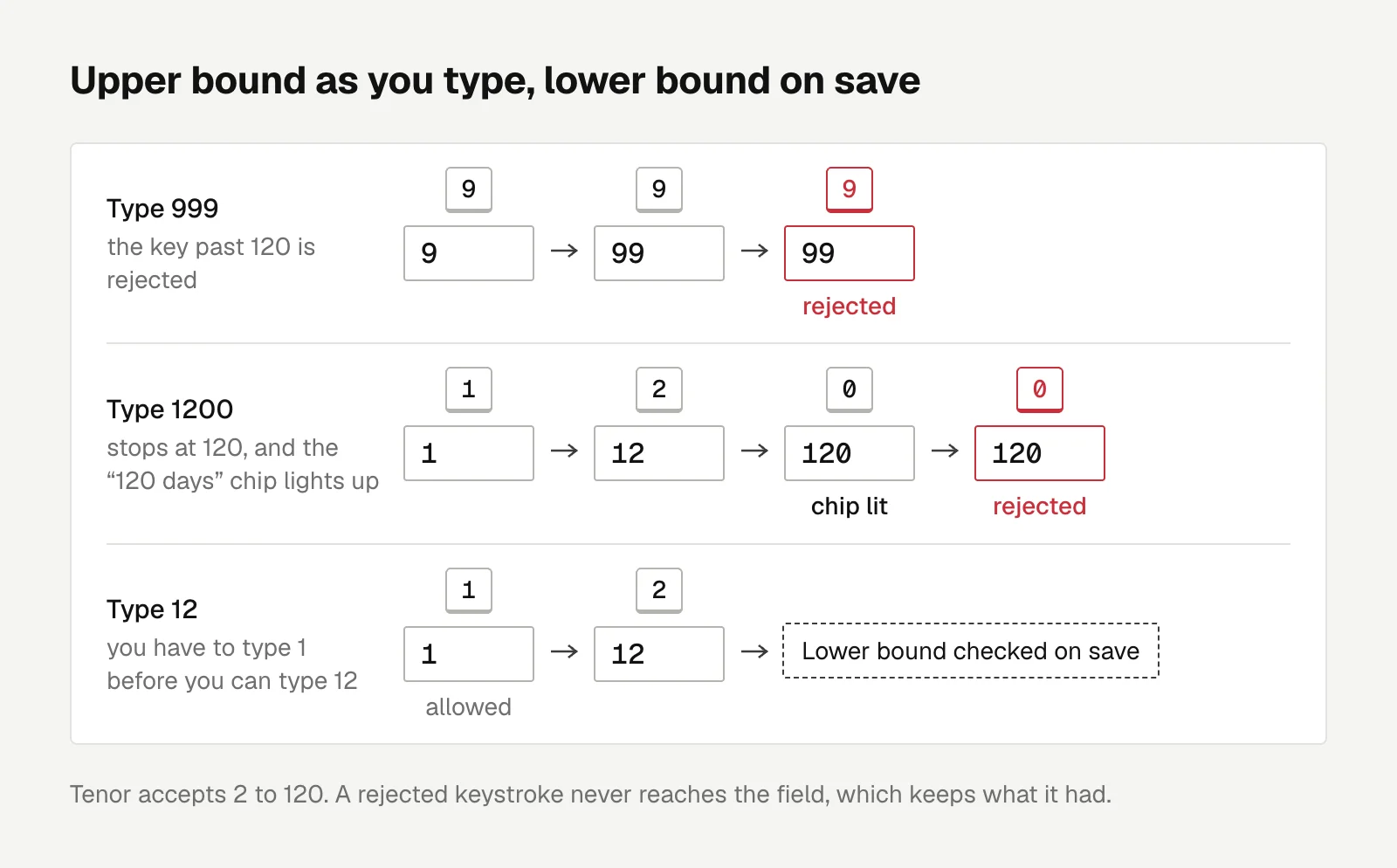
Bitfinex doesn't allow lending for more than 120 days anyway. So in the second version, any character that would push the value past 120 or make it a non-integer simply doesn't go into the field, and the field keeps what it had. Type 999 one character at a time and the field stops at 99. Type 1200 and it stops at 120, with the "120 days" chip lighting up.
I considered clamping anything over the limit to 120, but turning a typed 999 into 120 means replacing what the user typed with a different number. Rejecting that keystroke is more direct, and the user can see exactly which key was blocked.
The lower bound of 2 can't work that way. It has to wait until save, because you have to be able to type 1 before you can type 12.
The e key in type="number"
<input type="number"> lets you type e, plus and minus signs, and a decimal point, because 1e5, -3, and 1.5 are all valid ways to write a number.
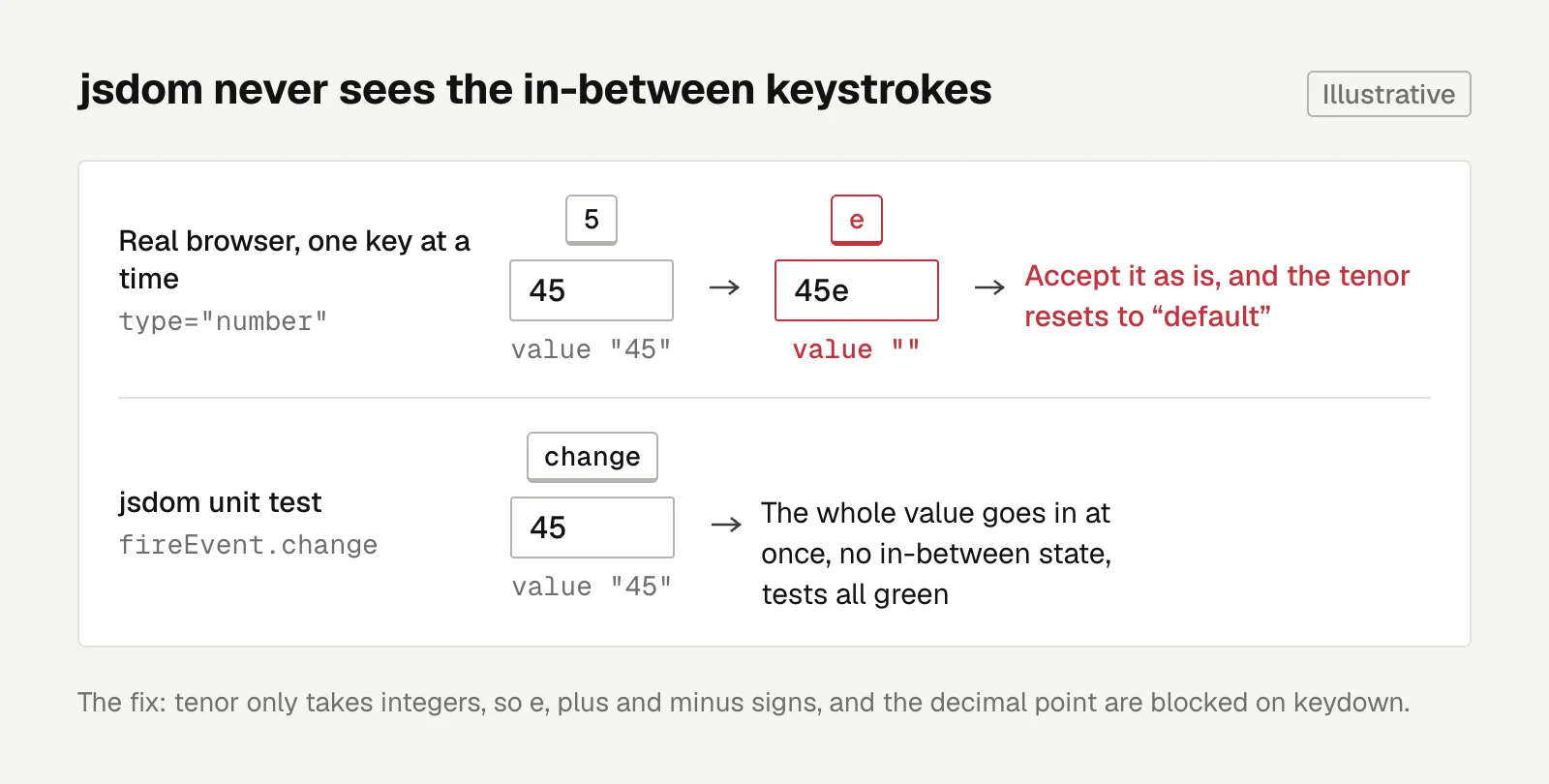
The problem is that the moment you type one of these characters, the value the input reports is an empty string. The HTML spec says:
User agents must not allow the user to set the value to a non-empty string that is not a valid floating-point number.
That's from the Number state section of the HTML Standard. The value is either a valid number or empty, so anything half-typed that isn't a valid number yet reads as an empty string.
Accept it as is, and the existing tenor gets reset to "default." Tenor only takes integers, so these keys are blocked on keydown.
I only found this trap while typing character by character in a real browser.
For every item I wrote a failing test first and then fixed it, and the unit tests were all green. But jsdom's fireEvent.change stuffs the entire value in at once and never passes through the intermediate states of typing, so no number of tests would ever reach that moment.
jsdom simulates a browser DOM inside Node; how fireEvent works is covered in the Testing Library docs.
So I also went through the edge cases one by one locally, in a real browser against a real backend. A reserve of 1e12, 1,000,000,001, 9 decimal places, or a negative number, sent straight to the backend, all came back 400. Clearing the reserve and saving was blocked. Entering 45 days and saving really sent 45.
After it went live on production I typed through it all again: 999 left only 99, and e, the decimal point, and the plus and minus signs couldn't be typed at all.
Hiding the spinner arrows with one CSS rule
The up and down arrows next to number inputs (the spin buttons) were spread across 7 files sitewide.
Instead of changing each one, I handled it with a single global CSS rule, so new number fields won't get arrows either.
Switching to type="text" would also remove the arrows, but the mobile keyboard and the accessibility role would change along with it. If all you want is to turn off the arrows, CSS is enough.

Engineering
High Coverage, Still Missing Tests? Using the CRAP Metric to Find the Functions That Need Them Most
With mostly agent-written code, high line coverage couldn't show whether the gaps sat in the most complex functions; a CRAP threshold of 8 cleared 200-plus offending functions and turned up 72 issues to fix.
Letters
Loading comments…