Engineering · 2026.10.01 · 5 min · Updated 2026.10.26
Designing a SaaS Admin Console: Kill Switches, Broadcasts, and Telegram Notification Channels
Once my lending platform had users and billing, I built an admin console and multi-channel notifications; this covers permissions, kill switches, broadcast transaction boundaries, Telegram binding, and recipient rules for targeted broadcasts.
Reading

If the admins of a SaaS can only query the DB directly or edit config files, there's no permission boundary and no audit context.
I built my admin console in several phases around a single principle. Every high-risk control has to be adjustable at runtime, have checkable permissions, and leave a record, instead of being scattered across environment variables.
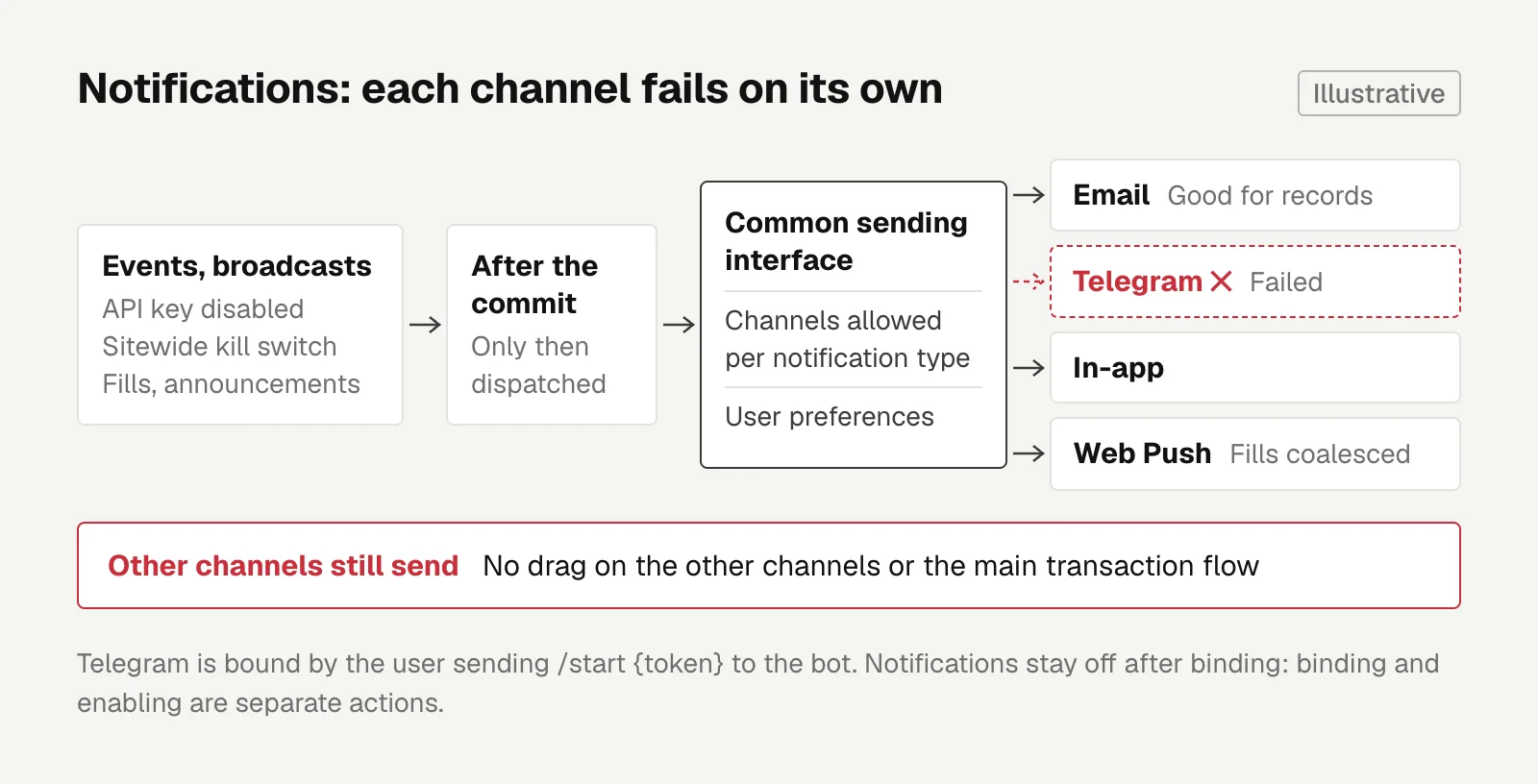
On the notification side, the principle is that each channel fails on its own, without dragging down the other channels or touching the main transaction flow.
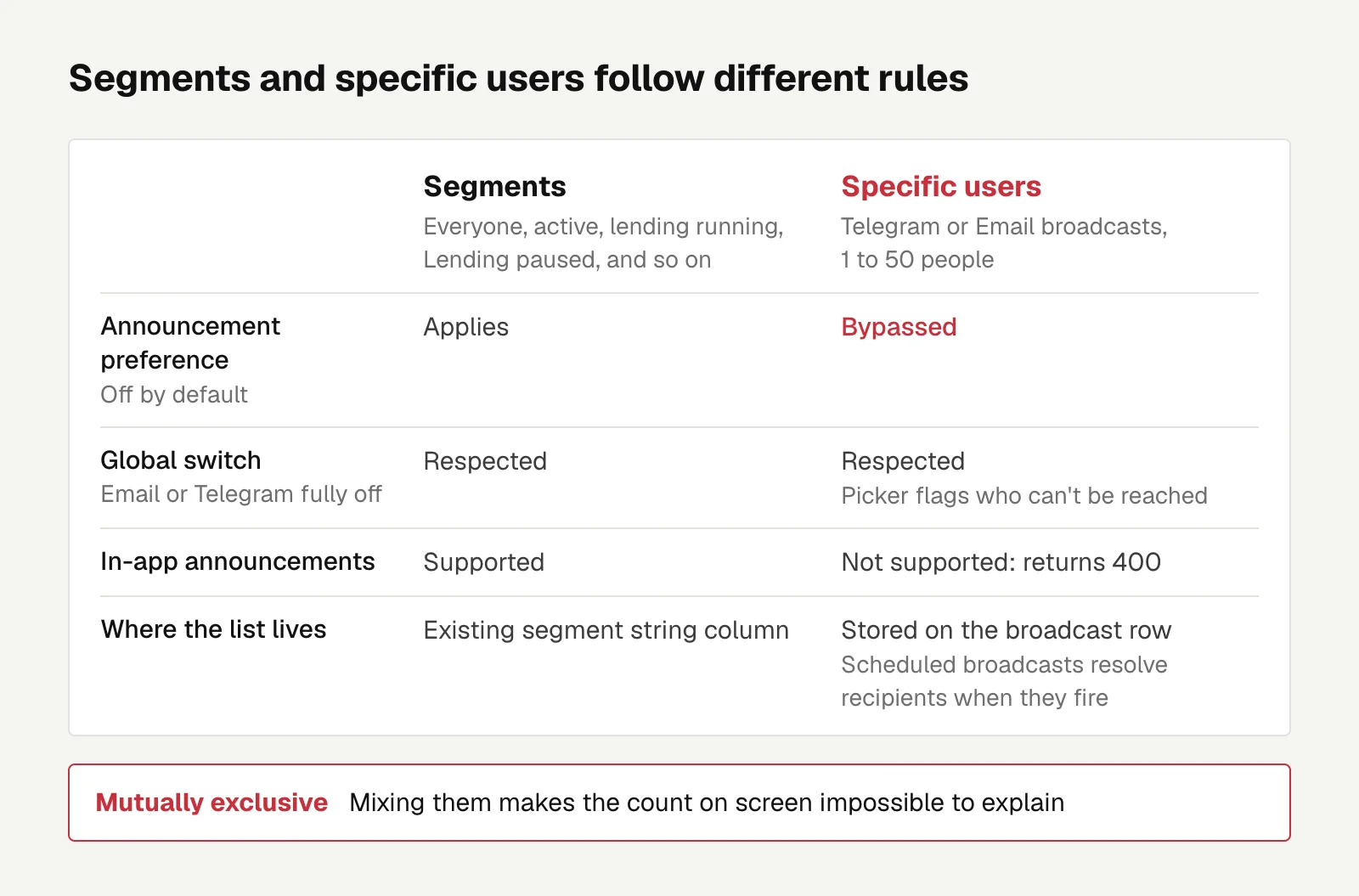
The most recent change lets a broadcast target specific users, and the hard part was the recipient rules. Targeted sends and segment sends follow different rules, and mixing them makes the count on screen impossible to explain.
The admin console came after my auto-lending platform grew from a bot into a service with users, billing, announcements, and operational actions. The billing side is covered in moving from performance fees to subscription billing.
Kill switches you can check and trace
The admin console was split into phases that could ship independently. First came the shell, user lookup, auditing, and viewing the app as a given user. Then came role permissions, billing, broadcasts, maintenance windows, feature flags, and kill switches (emergency switches that turn a feature off in one move).
A few key decisions:
- Permissions are decided by four roles plus a capability matrix, a table of which actions each role may take, not by whether the UI shows a particular button.
- A kill switch affects every user's fund operations, so toggling one requires a 2FA step-up, meaning you verify again at that moment.
- Maintenance windows go through one shared check, instead of each feature deciding for itself whether we're in maintenance.
- Broadcasts need durable scheduling and only dispatch after the transaction commits. Mail never goes out before the commit, and a schedule never sits in the DB unsent.
If asynchronous dispatch needs to read data written in the same transaction, it has to trigger only after the commit.
Notifications: each channel fails alone
Email is good for keeping a record, but it's too slow for events like an API key being disabled or a sitewide kill switch.
If every event sends its own notifications directly, channel failures and preference settings are hard to keep consistent. So I first pulled notifications into a common sending interface, with Email and Telegram as two parallel channels that can fail independently.
Telegram is bound by the user sending /start {token} to the bot themselves. That's Telegram's bot deep linking mechanism, which passes a parameter on startup and can be used to connect a Telegram account to an account elsewhere.
After binding, notifications are off by default. Binding and turning notifications on are two separate actions, because I don't want getting a chat id to count as implicit consent.
Clicking a link alone won't start messages.
Later I added a per-user notification history, event categories, preference settings, and an in-app notifications page, and only after that, browser Web Push as the fourth channel.
Web Push can reach users who don't have the page open, so which channels each notification type may use and how users set their preferences both need to be controllable. Fill events also got a coalescing window so high-frequency events don't turn into a flood of push notifications.
These phases were merged one after another, because the top nav, API client, i18n, and styles are shared files, and changing them in parallel would just mean constant conflicts.
Targeted broadcasts and "Lending paused"
Originally a broadcast could only target segments (everyone, active, lending running, and so on), with no way to send to just one or two people.
Telegram and Email also had an extra announcement notification preference that's off by default, so under the segment rules almost nobody could be reached.
I added "Specific users": in a Telegram or Email broadcast, you search by email or name and pick 1 to 50 people. Here are the rules I settled on:
- Targeted users bypass the announcement preference but respect the global switch. Targeting is an operator contacting particular people, not a mass announcement, but anyone who has turned off Email or Telegram entirely still doesn't get it, and the picker marks them.
- Specific users is mutually exclusive with the other segments. Segments go through the announcement preference and targeted sends don't, so mixing the two makes the count on screen impossible to explain.
- In-app announcements don't support targeting. An in-app announcement is a single sitewide row that can only be filtered by segment at read time, so the backend just returns 400.
- The list is stored on the broadcast row. A scheduled broadcast resolves its recipients only when it fires, so the list has to travel with the broadcast.
I also considered encoding user ids into the existing string column that holds the segment, but that column is only 200 characters, and the history page would need its own parsing.
I also added a "Lending paused" audience: people with an enabled API key who have either turned off lending themselves or been suspended for billing reasons.
It uses the same check as the "Paused" bot status on the admin users page, so the counts on both pages match. Pauses caused by the sitewide kill switch aren't included.
Don't mix audiences with different recipient rules in the same send, or the count turns into a number nobody can explain.
Engineering
Speeding Up Rust and Next.js CI on GitHub Actions: From 11.5 Minutes to 1.5 on a 2 vCPU Runner
After moving the backend to Rust, the PR backend job went from 11.5 minutes to 1.5 and frontend checks from 81 seconds to 30, mostly through test databases, bcrypt, and caches that broke silently.
Letters
Loading comments…