Engineering · 2026.10.02 · 6 min · Updated 2026.10.26
A JWT Expiry Race, 2FA Copy, and Client-Side Password Encryption: Three Account Security Fixes
My lending platform can reach users' exchange API keys, so after launch I fixed three account security issues: checking security copy against the backend, parsing JWTs once to avoid an expiry race, and encrypting passwords before sending.
Reading
On September 10, PROD threw one unhandled ExpiredJwtException, on a token that had expired just 1 millisecond earlier, right between validation and a field read.
That was one of three things I fixed after my lending platform's account security shipped, each with its own lesson:
- Before writing security copy, check the backend's actual gates, and don't promise protection that isn't there.
- When reading several fields from a JWT, parse it once.
- Whether a password travels in plaintext depends on where TLS terminates, not on what DevTools shows, so passwords are now encrypted in the browser before they're sent.
The context: users hand their Bitfinex API keys to the platform. The keys are stored encrypted, but if an account gets taken over, the attacker may be able to use that key through the platform.
So my principle is that a password, a session, or a single API action should never be the only line of defense.
Check 2FA copy against the backend
2FA uses standard RFC 6238 TOTP, the rotating one-time codes from an authenticator app.
Enabling it happens in two stages. The secret sits in Redis for 10 minutes and only becomes active once a correct code is entered, so someone who scanned the QR code but didn't finish setup won't lock themselves out.
Disabling it requires both the password and a code, so someone who only stole the session cookie can't turn the protection off. All of these checks live in the backend. Frontend restrictions are just there for convenience.
After the dashboard redesign, the 2FA hint on the settings page read "Logging in, changing keys and deleting your account will all require verification again."
That sentence was wrong. The product has no self-service account deletion at all, and the backend doesn't require a code for every key-related action.
The fix started with checking the backend for where regular users are actually asked for a code. The answer: at login, and when adding an API key with 2FA enabled. The copy now reads "You'll need to enter a code when logging in and when adding an API key."
The public site's copy already had a rule: don't describe features the product doesn't have. This sentence was one the app slipped through.
Now, before writing any security-related copy, I check the actual gates in the backend first.
Parse the JWT once
That ExpiredJwtException happened once and no users were affected, but the automatic triage opened an issue and marked it as needing a fix.
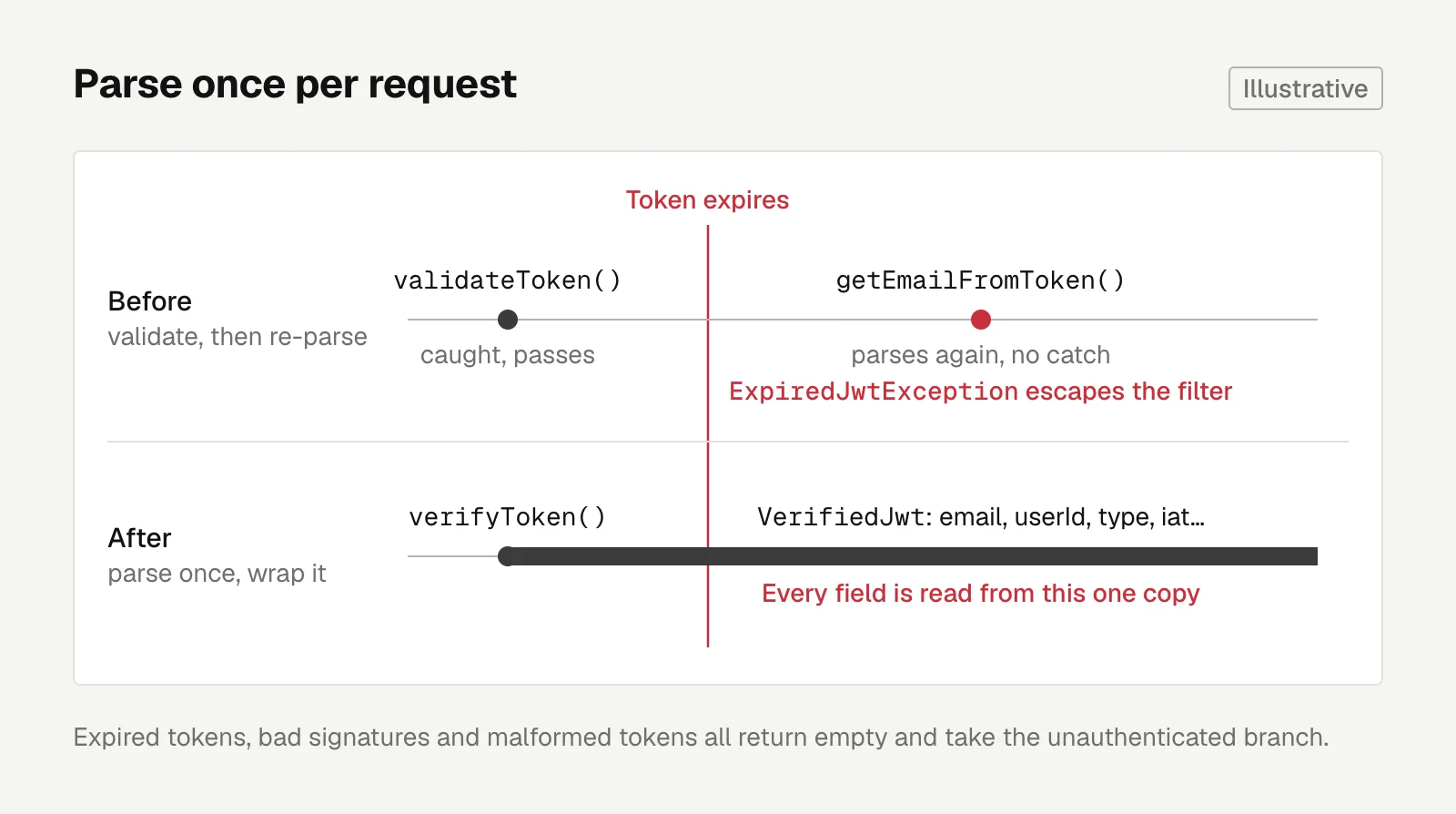
The problem was how JwtAuthenticationFilter was written. It first called validateToken(), which had a catch. If that passed, it called getters like getEmailFromToken field by field, and each one parsed the JWT again without catching anything.
If the token expired between two parses, it was still valid during validation but already expired during retrieval, and the exception escaped the filter. The refresh token flow was written the same way.
The fix is to parse once, wrap the result in an object, and have every caller read from that single copy:
public Optional<VerifiedJwt> verifyToken(String token) {
    Claims claims;
    try {
        claims = parseClaims(token);
    } catch (JwtException | IllegalArgumentException e) {
        return Optional.empty();
    }
    // Read email, userId, type, iat and impersonatorId from the same claims
    ...
}
Expired tokens, bad signatures, and malformed tokens all return empty and take the unauthenticated branch. Both the filter and refresh now consume this one result, and an expired refresh token returns a business error instead of a 500.
The old per-field getters and validateToken were all deleted. Nothing in the main code uses them anymore, and if they stayed, the next person writing auth code could easily assemble the same race out of them.
The automatic triage suggested adding an outer catch for JwtException. I didn't take it. That only swallows the symptom, and the easy-to-misuse API would still be there.
An API that nobody uses and that's easy to misuse should be deleted once the fix is in.
Plaintext depends on where TLS ends
This one started with a misunderstanding. I thought Bitfinex's API responses were hidden in DevTools and wanted to do the same.
Going back to the screenshot, the "Failed to load response data" came from clicking a blocked Google Analytics request, which never had a body in the first place.
Thinking it through, the idea didn't make sense anyway. If the browser has to draw the data on screen, it has the data, and decrypting it in the frontend is just obfuscation.
The Payload tab in DevTools shows the content before the browser encrypts it. Any site can see what it sent. Whether something goes out in plaintext depends on where TLS terminates.
Seen that way, passwords really did have a problem. In four requests (login, sign-up, password reset, and disabling 2FA), the password was a plaintext field in the request body.
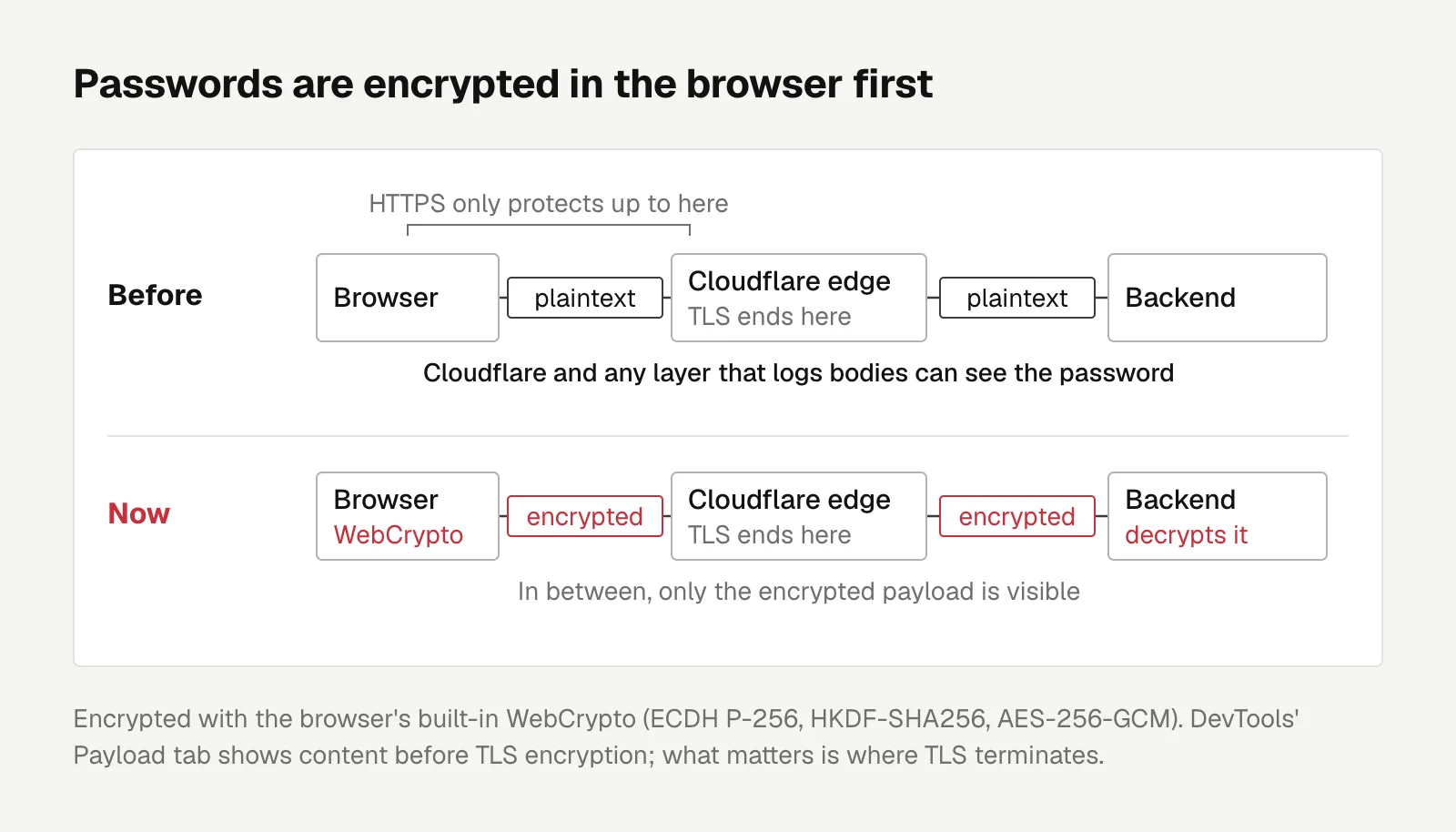
HTTPS only protects data up to the TLS termination point, and Cloudflare terminates TLS at the edge. Its docs describe exactly that hop:
These certificates secure the encrypted connection between your visitors and Cloudflare.
That's from Cloudflare's edge certificates docs. So Cloudflare, and any intermediate layer that logs request bodies, can see the password.
Many people reuse passwords across sites, so a leak here spreads beyond this one.
Encrypting passwords with WebCrypto
Now, before sending, the frontend fetches a public key and the server time from the backend. It then uses the browser's built-in WebCrypto to encrypt the password (ECDH P-256, HKDF-SHA256, AES-256-GCM), without adding any dependencies.
The backend decrypts it and reruns field validation, and everything after that is unchanged. Neither the DB nor the password hashes had to change.
A few trade-offs:
- The backend key is regenerated on every startup and isn't stored in env. Even if backend secrets leak later, previously intercepted payloads can't be decrypted.
- Each payload is bound to its purpose and expires after 5 minutes by the backend's own clock, so an old payload picked up from a log can't be replayed to log in.
- It isn't single-use. Anyone who can intercept and replay a payload in real time can also grab the session cookie from the response, so an extra Redis write buys nothing.
The backend tests include a payload actually produced by the frontend code, pinning both sides' format and key derivation. If either side changes the algorithm, the test goes red.
Before adding a mechanism, think through who else it actually stops. If it doesn't stop anyone new, skip it.

Engineering
Lighthouse Timing Out on a Next.js Site? The Cause Was One Unread Response Body
My mobile PageSpeed score was 46 and Lighthouse timed out on every run. The main cause was an unread body on anonymous refresh requests. After fixing it and a few other things the score hit 61, and public pages stopped checking login state.
Letters
Loading comments…