Engineering · 2026.10.25 · 6 min · Updated 2026.10.26
muse.ai Email Approval Cards Getting Skipped: Moving a Chrome Extension From Button Text to React Data
A store review said my extension skipped email approval cards. One approval can appear in three forms and labels vary by action and language, so 1.3.0 reads Muse's attributes and React data instead.
Reading

A 4-star review on the Chrome Web Store said email approval cards still had to be approved by hand.
The extension is mine: Auto Approve for Muse, which clicks through muse.ai's approval cards for you. I went through every approval card I could get Muse to trigger, and the conclusion was that matching button text doesn't hold up. The same approval appears in three forms, can turn from one into another in place, and its button labels change with the action and the UI language.
Version 1.3.0 reads the attributes Muse puts on its own buttons and the approval data inside React, and only falls back to text when that data isn't there.
How the earlier versions find cards and how the trust list works is in auto-approving muse.ai cards with a trust list.
Why the email card was skipped
In the Traditional Chinese UI, the Gmail send card has three buttons: Send, Always allow this recipient, and Don't send.
My code first had to identify a deny button and an allow button. "Don't send" didn't match the deny rules and "Send" didn't match the allow rules, so the whole card was skipped. It didn't even show up in the waiting-for-you list.
Connector cards label the button with the action itself, so every action has different wording, and a list of allow words will never be complete.
Then I noticed Muse marks the primary button with data-hatch-approval-primary-action. The allow button is now found by that attribute, and the deny rules gained the Chinese words for "don't" in both scripts plus the English don't.
One approval, three forms
Once I had triggered every kind of card, the hard part turned out to be that one approval can appear in three places. It can be a single card in the chat, an entry in the review list of the right-side panel, or an item inside a batch card that groups several approvals. The chat and the panel often each have a copy.
Batch items are [role=button][aria-expanded] elements with their own primary button, and the title sits in span[title].
The trouble is that they keep changing. While Muse processes one item, it ignores other clicks on the same card, then re-renders the whole card. When only one item is left, the batch card turns back into a single card in place, as a new DOM node.
My first version clicked several items in a row, and only the first click counted. Now it clicks one item per card per round and waits one second before looking again.
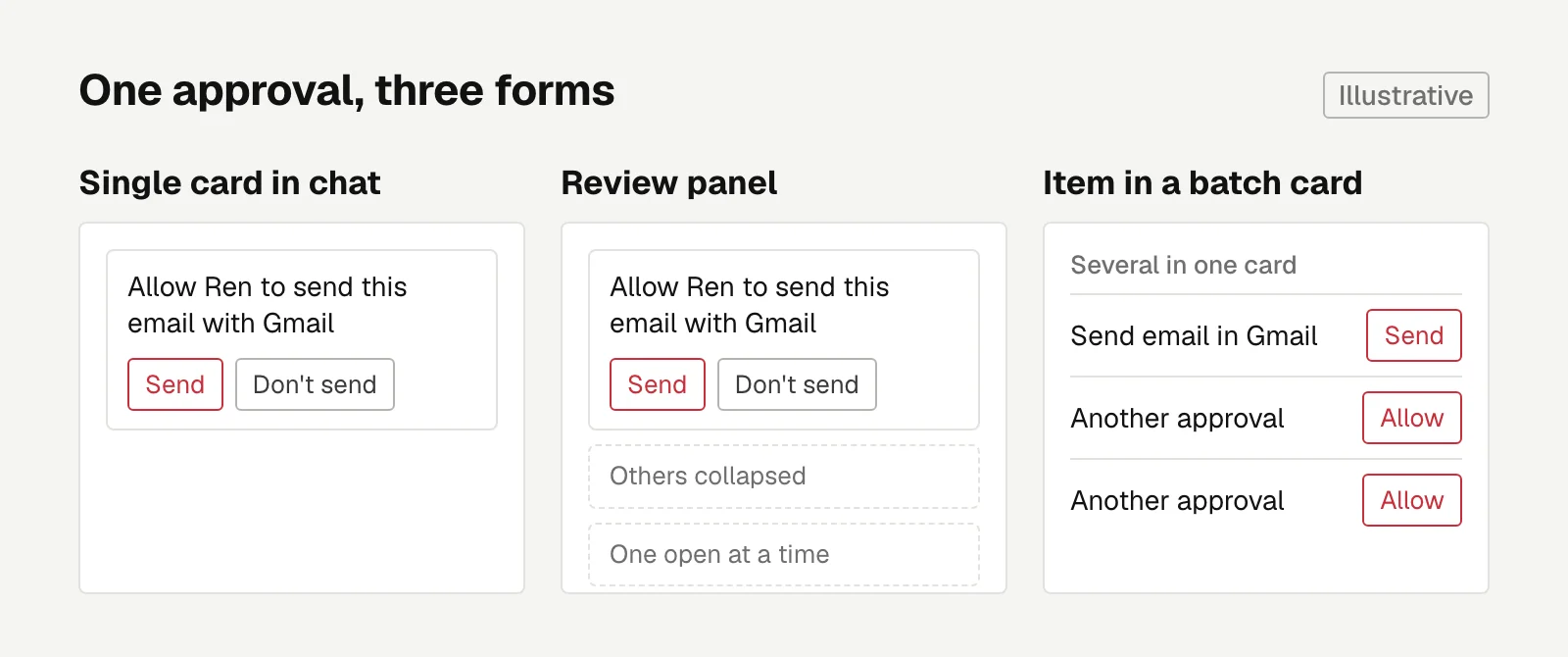 Chat and panel each hold a copy; the batch item's title differs.
Reading React data from an isolated world
Text can't tell you that the three forms are the same approval. The single card's title is "Allow Ren to send this email with Gmail", and the batch item says "Send email" in Gmail. Nothing in the DOM links the two.
Only the React props (the data a component receives) have something in common: both carry the policySubject connector.gmail.users.messages.send.
The catch is that an extension's content script runs in an isolated world. It can see the page's DOM but not the page's own JavaScript variables, so React's internals are out of reach.
So I added bridge.js with world: MAIN in the manifest, which runs it in Muse's own JavaScript context.
React hangs an internal object (a fiber) on each DOM node, and walking up from it leads to the component's props. The bridge walks up from each card's node, finds the props that hold approval data, and writes the approval ID and policySubject into DOM attributes for the content script to read:
// bridge.js: walk up from a DOM node to the component whose props carry approvalId
function approvalsOf(el) {
  const key = Object.keys(el).find(k => k.startsWith('__reactFiber$'));
  for (let f = key && el[key], i = 0; f && i < 12; f = f.return, i++) {
    for (const v of Object.values(f.memoizedProps ?? {})) {
      if (typeof v?.approvalId === 'string') return [v];
      if (Array.isArray(v) && v.length && v.every(a => typeof a?.approvalId === 'string')) return v;
    }
  }
  return [];
}
It also finds the approvals query in the react-query cache and writes the IDs of every pending approval onto <html>.
With that in place, trust rules match on policySubject, and old rules fill it in automatically the first time they meet a card with the same title. Duplicate cards are removed by approval ID, so each approval gets clicked once.
Subtracting the approvals this tab has seen from all pending ones tells the extension that another chat or a scheduled task is still waiting. It then opens the approvals tab in the right-side panel and only clicks approvals on the trust list. If everything there is untrusted, it won't open the panel again for 10 minutes.
Whenever the bridge can't read the data, everything falls back to matching text.
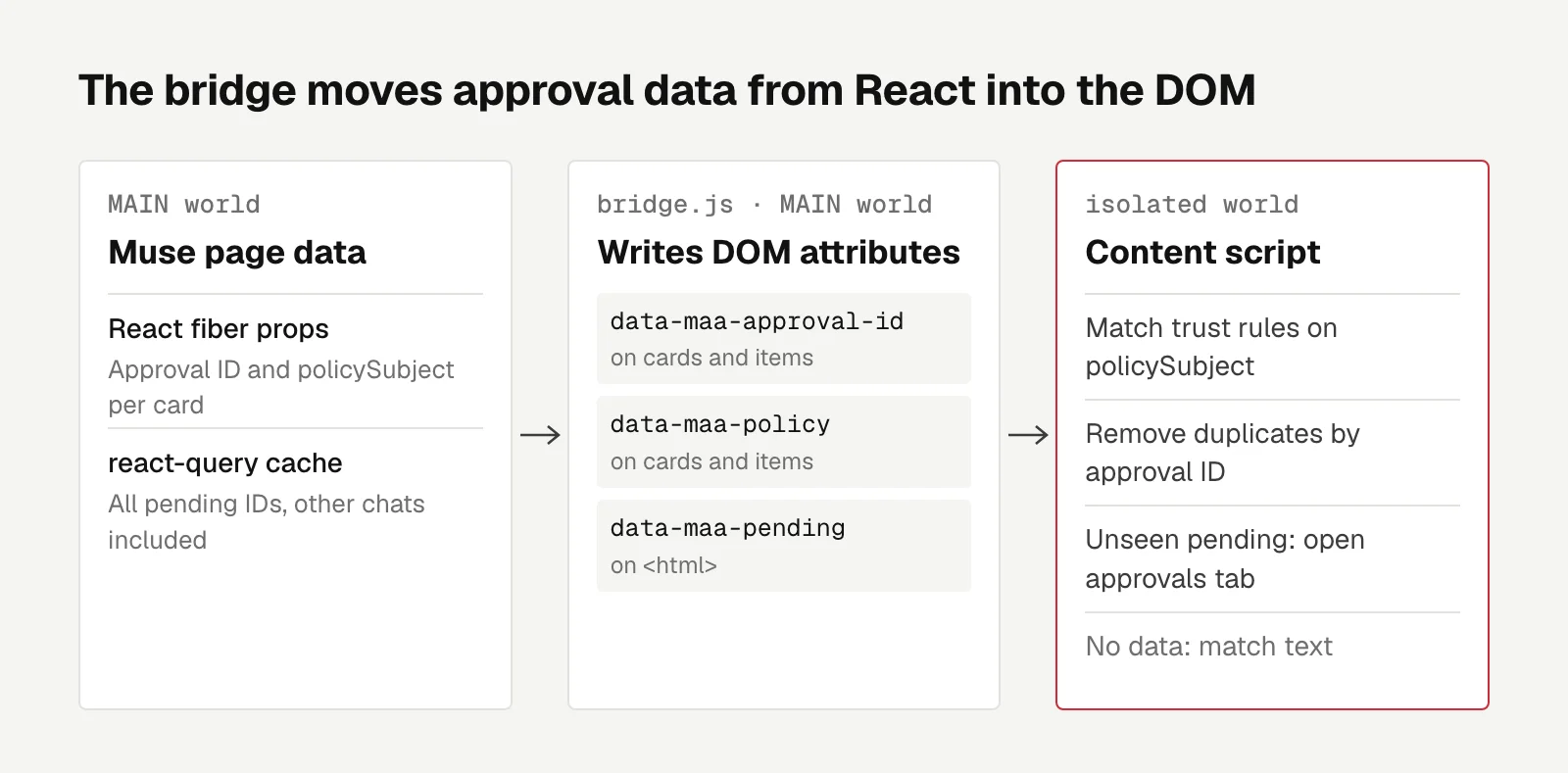 The bridge only writes DOM attributes; trust decisions stay in the content script.
Checkout cards stay manual
Trusting a chat means anything that chat asks for gets approved. Until now the worst case was a post that can't be taken back. With checkout cards, the worst case is spending money.
Version 1.3.0 recognizes these cards by the words in Muse's own translation files (checkout, place order, purchase, in both Chinese scripts) and never clicks them, whatever the trust settings say. The popup only offers "Allow just this once" for them.
I never actually triggered one. Muse's purchase approval only shows up at the payment step. Getting there means submitting a merchant form with real personal details, or connecting a wallet with a shipping address in one of a few specific countries. I decided not to test it.
Language switching and the Muse risk
I didn't install the extension in Chrome for this round. Instead I ran the repo's code directly on the Muse page for a round of detection, trust matching, and clicks on real cards in the Traditional Chinese, English, and Simplified Chinese UIs.
Switching languages caught a lot of missed wording. The English UI says a card in another chat "comes from" somewhere, while my rules only knew "is from" and "came from". chrome.storage was faked, so writing the activity log wasn't actually exercised.
One more catch had nothing to do with text: "Always allow" sits inside a Radix menu, and .click() doesn't open it. You have to dispatch pointerdown.
The cost is that this version depends on Muse's internals: React props, the react-query query, an avatar attribute, and tab names. A Muse redesign could break it. When it does, the extension falls back to text, and batch cards and duplicate cards get handled less well.
What I took away: when automating someone else's site, look for the attributes and data the site itself provides before matching on-screen text. And with components that transform in place, do one thing per round and wait for the re-render before deciding the next step.

Engineering
Two Minutes to Publish: Moving a Static Astro Blog to Rendering on Cloudflare Workers
Every post used to trigger a 1 to 2 minute rebuild. With Workers rendering and edge caching, publishing now purges one cache tag and goes live in about 5 seconds, on the free plan.
Letters
Loading comments…